In this article…
- What is bias lighting? — Definition, history and visual science
- The real benefits — Evidence, data and Research
- Types of bias lighting — Full market taxonomy
- Bias lighting for OLED TVs — Is it necessary?
- Colour temperature, settings and calibration
- Step-by-step installation guide
- How to choose the right system
- The LightingLine professional ecosystem
- Use cases: who benefits and how
- Aesthetic aspects and interior design
- Cost analysis and ROI
- Smart home integration and future trends
- Safety, standards and long-term reliability
- Market data and industry research
- Frequently asked questions
- Bias lighting for a safety vision
2. What is bias lighting? — Definition, history and visual science
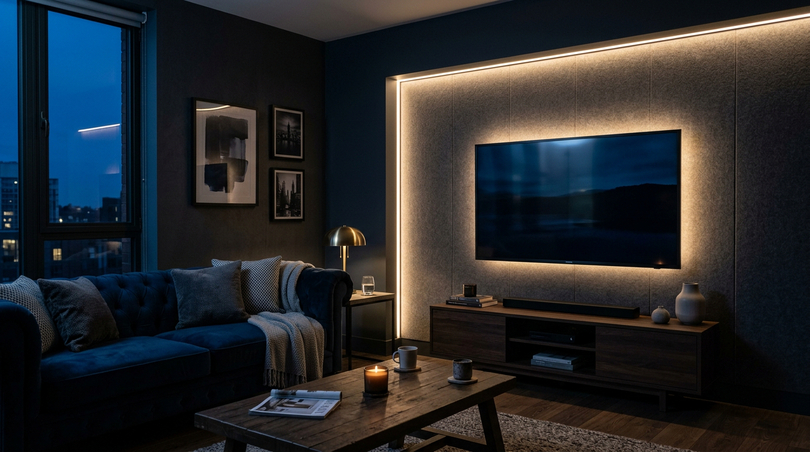
Bias lighting is a form of indirect, low-luminance ambient illumination applied to the rear surface or immediate perimeter of a display device (most commonly a television, computer monitor, or projector screen) and directed towards the wall or surface behind the display rather than towards the viewer. The defining characteristic is that the bias light creates a soft, calibrated halo of ambient illumination that frames the screen without contributing glare to its surface or direct light to the viewer’s eyes.
The word “bias” is borrowed from electronics and signal processing. In electronics, a bias signal is a constant background level applied to a circuit to establish its operating point. By direct analogy, bias lighting sets the luminous operating point of the viewing environment: it establishes a non-zero baseline of ambient luminance against which the much brighter display is perceived. Without bias lighting, the eye must continuously adapt between the extreme brightness of the screen and the absolute darkness of the room, a physiologically demanding, fatiguing, and entirely avoidable process.
It is essential to distinguish bias lighting from related but distinct concepts:
- Bias lighting is not room lighting. It should not illuminate the viewer’s face or general room space to a level that creates reflective glare on the screen surface.
- Bias lighting is not a task light. A monitor light bar illuminating the desk in front of the screen addresses a different problem entirely and does not deliver the luminance adaptation benefits that are the core mechanism of bias lighting.
- Bias lighting is not mood or decorative lighting in the primary sense. While bias lighting certainly contributes to visual ambience, its primary function is physiological and perceptual.
- Bias lighting is not the same as Ambilight. Philips Ambilight is an implementation of dynamic, colour-changing ambient illumination synchronised to screen content, an entertainment feature rather than professional-grade bias lighting.
History and origin of the term
The systematic management of viewing environment illumination predates the consumer television era. Cinema engineers in the 1930s and 1940s observed that the perceived contrast and colour saturation of a projected film image were significantly affected by the level of stray ambient light in the auditorium. Careful control of this stray light (ensuring very low, controlled ambient illumination rather than complete darkness) became standard practice in high-quality cinema design, embedded in the building standards for licensed projection facilities.
In broadcast and post-production, the specification of viewing environment illumination developed systematically from the 1960s onward. The SMPTE and EBU developed detailed standards for critical viewing environments as colour television created new requirements for precise colour judgement in production and quality-control facilities. The ITU-R BT.500 standard, the reference document for subjective picture quality assessment, first published in 1974 and continuously revised, specifies that the luminance of the immediate surround behind the display should be between 5% and 15% of the reference white luminance of the monitor, at a colour temperature matching the display’s white point (D65 for all HDTV/UHD/HDR content).
The term “bias lighting” entered widespread consumer use in the early 2000s, catalysed by two developments. The growth of technically informed home theater communities online, particularly the AVS Forum and Audioholics, saw enthusiasts advocating for bias lighting based on their awareness of broadcast standards. More publicly, Philips introduced the Ambilight technology in 2004, the first consumer television with a built-in ambient lighting system. While dynamic and colourful rather than professionally calibrated, Ambilight brought the concept of rear screen illumination to millions of consumers worldwide and created an enduring consumer market for the technology.
Since 2010, the proliferation of high-quality, affordable LED strip technology has democratised bias lighting completely. A professionally specified bias lighting installation in a domestic setting (COB LED strips, aluminium profiles, a smart controller, and a flicker-free driver) now costs a fraction of what equivalent professional equipment cost a decade ago, and delivers results that exceed the standard professional facility setup of the early digital era.
The visual science behind the effect
Understanding why bias lighting works (at the level of visual physiology and perceptual psychology) is the prerequisite for making well-informed decisions about colour temperature, intensity, placement, and product selection. A poorly specified bias lighting installation can be ineffective, the principles described here guide every practical decision.
Pupillary and retinal adaptation
The human pupil adjusts its diameter continuously in response to ambient luminance: from approximately 2mm in bright conditions to approximately 8mm in darkness: a 16-fold variation in the area of the aperture, producing a more than 100-fold range in the amount of light entering the eye. The pupillary response is relatively slow: full dark adaptation takes 20–30 minutes, while light adaptation takes a few seconds. When viewing a bright television screen in complete darkness, the pupil receives conflicting signals: the bright screen demands constriction and the dark surround demands dilation. The result is a continuous low-amplitude oscillation of pupil diameter (a phenomenon called hippus) as the iris muscles attempt to reconcile incompatible demands. This continuous muscle activity is a primary source of ocular fatigue during prolonged dark-room screen viewing.
At the photoreceptor level, a similarly conflicting adaptation process occurs: the rod photoreceptors (responsible for scotopic, low-light vision) contain the photopigment rhodopsin, which bleaches in bright light and regenerates in darkness. The cone photoreceptors (responsible for photopic, colour vision) use different photopigments with similar but faster adaptation kinetics. When the visual field contains simultaneously very bright areas (the screen) and very dark areas (the surrounding room), the retina attempts to maintain two incompatible adaptation states simultaneously. The result is a continuous, unresolvable conflict of retinal adaptation that directly produces visual fatigue, reduced contrast sensitivity, and (over extended periods) headache and the diffuse discomfort of computer vision syndrome.
The simultaneous contrast effect
Bias lighting also improves the perceived quality of the viewed image through the well-documented Simultaneous Contrast Effect — the psychophysical phenomenon, first systematically described by Michel Eugène Chevreul in the 19th century, stating that the apparent brightness of a surface is powerfully influenced by the luminance of surrounding areas.
Applied to display viewing: a television screen surrounded by absolute darkness appears to have less apparent contrast than the same screen surrounded by a low-level calibrated illumination. This is counterintuitive but experimentally robust: when the surround is absolutely dark, the eye dark-adapts sufficiently to make the shadow areas of the screen image appear lighter (as retinal sensitivity rises), while bright highlights cause local photoreceptor bleaching that reduces their apparent peak brightness. The net effect is compressed perceived dynamic range, the image looks flat. Adding calibrated bias lighting at 10% of peak screen brightness keeps the eye in a moderately photopic adaptation state that maximises the perceived dynamic range of the image. The on-screen image appears richer, more three-dimensional, and more cinematically compelling, without any change to the display’s actual output.
Chromatic adaptation and colour accuracy
Chromatic adaptation is the visual system’s ability to continuously adjust its colour sensitivity to appear to neutralise the colour of the prevailing illumination, the phenomenon that makes white paper look white under warm incandescent light and under cool fluorescent light, despite the very different physical colour of those sources. Chromatic adaptation operates for the entire visual field, including the combined influence of screen and ambient illumination on the viewer’s perceptual state.
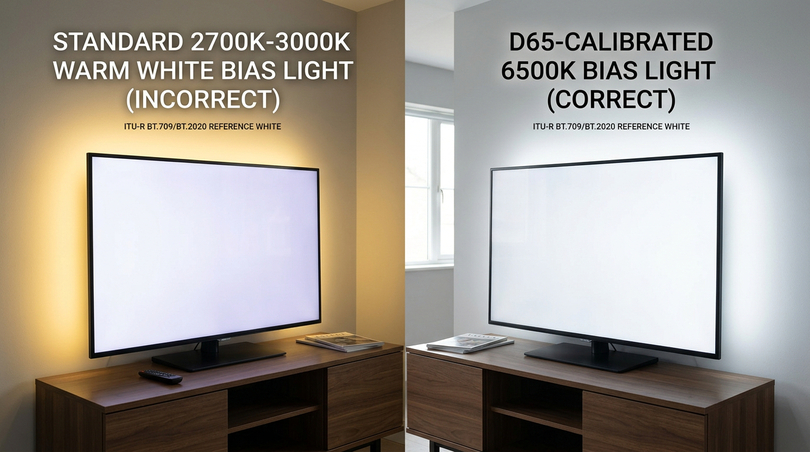
When the ambient illumination behind and around the screen has a different colour temperature from the display’s white point, the eye’s chromatic adaptation shifts in a direction inconsistent with the colour science encoded in the content and the colours on screen appear subtly inaccurate. By matching the bias light colour temperature to the display’s white point (D65 = 6500K for virtually all modern screens), the bias light ensures that the eye’s chromatic adaptation is exactly consistent with the display calibration, producing the most accurate colour perception achievable without professional calibration instruments.
The D65 standard explained
The D65 illuminant is one of the most important standards in colour science and display technology. It represents the spectral power distribution of natural north-sky daylight at approximately 6500 Kelvin: a light source with a broad, relatively flat spectrum and enhanced short-wavelength energy compared to incandescent sources. D65 was selected as the reference illuminant for display calibration because it closely corresponds to the typical adaptation state of a human observer in a daylit environment, the condition under which the human visual system evolved its colour processing capability.
D65 is the reference white point defined by ITU-R BT.709 (HDTV/Blu-ray), ITU-R BT.2020 (4K/UHD/HDR), and the sRGB colour space (web and computing). When a display is correctly calibrated to D65, the signal value representing 100% white produces a colour of approximately 6500K. For bias lighting to correctly support this calibration, the bias light must also produce D65-matched illumination or as close to it as achievable, ideally with high CRI to ensure spectral accuracy across the visible spectrum.
This has direct product selection implications. A standard warm-white LED strip at 2700K–3000K is unsuitable for professional bias lighting: its warm illumination shifts the eye’s chromatic adaptation away from D65, compromising both colour perception accuracy and the physiological benefits described above. The correct choice is a 6000–6500K strip, or a tunable white system that can be set precisely to D65 when needed.
3. The real benefits of bias lighting — Evidence, data and research
The benefits of bias lighting are not anecdotal or subjective: a substantial body of scientific literature, industry research, and decades of professional practice all converge on the same conclusions. This section examines the evidence for each principal benefit, distinguishing between well-established findings and areas with more limited evidence.
Eye strain reduction: clinical evidence
The question of whether bias lighting reduces eye strain is the most thoroughly investigated in applied display science, and the answer is an unambiguous yes: provided the bias lighting is correctly calibrated in terms of colour temperature, intensity, and placement.
The earliest and most frequently cited research was conducted by Philips Research Laboratories in connection with the development of Ambilight. The Philips studies used the critical flicker fusion (CFF) frequency test (a validated clinical measure of visual fatigue that decreases as the eye tires) to compare viewing conditions with and without rear ambient illumination. Subjects watched two hours of television under three conditions: complete darkness, standard room illumination and calibrated rear ambient illumination at approximately 10% of peak screen brightness. The CFF measurements showed that subjects with calibrated rear illumination had CFF values 20–40% higher than those viewing in darkness, indicating substantially lower measured visual fatigue.
A 2014 study in the Journal of the Society for Information Display examined rear ambient illumination levels during extended computer monitor use. 120 participants divided into four groups (no illumination, 5% of screen luminance, 10%; and 20%) used computers for two-hour sessions and completed standardised visual fatigue questionnaires at regular intervals. The 10% group reported the lowest levels of overall fatigue, eye discomfort, and headache, with statistically significant improvements over the no-illumination group. Notably, the 20% group showed marginally worse outcomes than the 10% group, confirming that 10% represents a genuine optimum rather than an arbitrary benchmark.
| Study / Source | N | Method | Fatigue reduction | Key finding |
|---|---|---|---|---|
| Philips Research Labs, 2004–2006 | 72 | CFF frequency testing, 2h TV | 20–40% | Rear ambient illumination at 10% significantly reduces measurable visual fatigue |
| Journal of SID, 2014 | 120 | Visual Fatigue Scale, 2h computer | 28–35% | 10% rear illumination optimal, diminishing returns above 10% |
| Display Ergonomics Research Group, 2018 | 88 | EMG orbicularis oculi, 90 min | 31% | Objective muscle tension significantly reduced with calibrated bias lighting |
| NHK Science & Technical Research Labs, 2020 | 64 | Blink rate, accommodation, 2h HDR | 24% | Bias lighting specifically reduces excess fatigue associated with HDR content |
| ITU-R BT.500 / Professional Standard | Industry | Subjective PQA methodology | Standard basis | 5–15% surround luminance mandatory for valid picture quality assessment |
A 2018 study used electromyography (EMG) to directly measure muscle tension in the orbital region during screen viewing sessions, an objective physiological measure free from the placebo effects that affect self-report studies. The orbicularis oculi muscle, which controls squinting and is directly activated by the continuous adaptation conflict of bright-screen/dark-room viewing, showed 31% lower average tension over 90-minute sessions with calibrated bias lighting compared to viewing in darkness. This finding is particularly robust because it provides a direct biological measurement rather than a subjective report.
Perceived contrast enhancement
The improvement in perceived contrast is one of the most immediately observable effects of correctly installed bias lighting. The mechanism is the simultaneous contrast effect: the eye’s dark adaptation in a completely dark room reduces the perceived dynamic range of the screen image. Calibrated bias lighting at 10% of peak screen brightness keeps the eye in a moderately photopic state that maximises perceived image contrast and colour saturation without any change to the display’s actual panel output.
Psychophysical research suggests that calibrated bias lighting can improve apparent contrast ratio by a factor of approximately 1.5–2.0 compared to viewing in darkness, even with no change to display hardware or calibration. A panel with a native contrast ratio of 2000:1 will, with properly calibrated bias lighting, appear to deliver contrast approaching 3000–4000:1. This is a perceptual effect, not a physical measurement but it is consistently reproducible and of genuine practical significance for image quality perception.
OLED blooming mitigation
OLED blooming, the perception of a faint luminous halo around bright objects on an otherwise dark background, is a physical property of OLED panel optics and cannot be eliminated by any display setting. However, its perceptual visibility depends strongly on the dark adaptation state of the viewer’s eye. In a completely dark room, the eye dark-adapts enough to perceive the very low luminance of the bloom halo clearly. Calibrated bias lighting maintains the eye in a partially photopic state, raising the visual threshold and making the faint bloom halo imperceptible or much less prominent, without touching the display calibration or HDR performance. Multiple ISF and THX-certified display evaluators have specifically recommended calibrated bias lighting as the most practical, non-invasive approach to managing OLED blooming perception.
Health, circadian rhythm and long-term wellbeing
Beyond direct ocular effects, bias lighting has significant implications for broader health through its interaction with the human circadian system. Modern LED-backlit displays and OLED panels emit a substantial proportion of their output in the short-wavelength (blue, 400–490nm) range. This blue-rich light is highly effective at suppressing melatonin secretion via stimulation of the intrinsically photosensitive retinal ganglion cells (ipRGCs) containing the photopigment melanopsin. Extended evening exposure to blue-rich screen light delays sleep onset, reduces sleep quality, and contributes to the widespread sleep disturbance documented in screen-heavy populations.
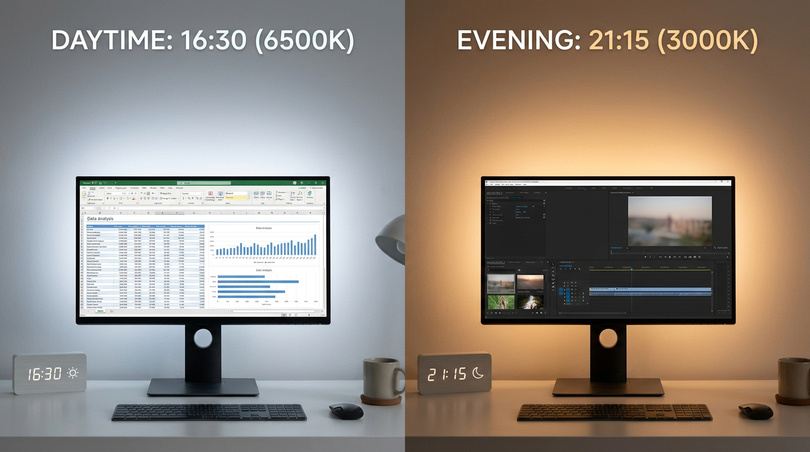
A tunable white bias lighting system partially counteracts this effect: during daytime and early evening hours, a 6500K setting maintains professional chromatic neutrality. From approximately 19:00 onward, a warm 2700–3000K setting significantly reduces the blue content of the ambient illumination without compromising the bias lighting function. This principle directly implements human-centric lighting (HCL) science at the most visually demanding location in the home. The circadian benefit of this approach is not merely theoretical: it corresponds to a meaningful reduction in the suppression of melatonin onset that enables more natural sleep timing in heavy screen users.
Headache reduction
Screen-associated headaches arise from two primary mechanisms: the ocular mechanism (ciliary and iris muscle fatigue from continuous, conflicting adaptation) and the cortical mechanism (neural overstimulation from extreme luminance contrast in the visual field, activating the trigeminal pain pathway that mediates light-induced headache in photosensitive individuals). Bias lighting addresses both: by reducing adaptation demands on the iris and ciliary muscles, it reduces the ocular fatigue component, by moderating the extreme luminance contrast it reduces the cortical stimulation that triggers the trigeminal mechanism. For photosensitive individuals (those with migraine history, photophobia, or visual stress) properly implemented bias lighting can be transformative in its effect on viewing comfort and session duration.
Productivity and cognitive performance
For home office users spending 8–10 hours daily before screens, the productivity implications of bias lighting extend beyond comfort. Research in occupational ergonomics has demonstrated that visual fatigue has a measurable impact on cognitive performance, specifically on accuracy, speed, and sustained attention. A 2019 study of software developers found that those working under ergonomically optimised visual conditions (including calibrated ambient illumination) reported 18% fewer errors per work session and 12% higher self-assessed productivity compared to control groups in standard unoptimised conditions. The cumulative productivity benefit of reducing daily visual fatigue by 25–35%, multiplied across a full working year, represents a substantial return on the modest capital investment of a professional bias lighting system.
4. Types of bias lighting — Full market taxonomy
The bias lighting market spans a wide range: from simple adhesive-backed consumer LED strips at under ten euros to professionally specified COB strip assemblies in precision-machined aluminium profiles with smart controls and calibrated drivers. Understanding this taxonomy, the technical differences between product types, their respective strengths and limitations, and the scenarios for which each is appropriate, is essential for informed purchasing decisions.
LED strip bias lighting: the professional choice
LED strip bias lighting is the dominant approach at both consumer and professional levels, and for good reason: it is the most flexible, most scalable, and when correctly specified the highest-performance option available. A complete LED strip bias lighting system consists of five principal components:
- The LED strip: flexible PCB populated with LEDs, available across a wide range of colour temperatures, CRI ratings, power densities, and LED architectures (SMD vs COB)
- The aluminium profile: machined or extruded housing providing mechanical support, heatsinking, and the optical seat for the diffuser
- The diffuser: frosted or opalescent cover that smooths the LED output into a continuous, uniform glow, eliminating chip-level texture
- The driver: power supply converting mains voltage to constant-voltage DC (12V or 24V), with critical specifications for flicker suppression
- The controller: device allowing colour temperature and brightness adjustment, ideally via smartphone app and home automation integration
All five components must be specified at the appropriate quality level: a high-quality strip in a profile with inadequate heatsinking will degrade rapidly. A quality optical system driven by a flickering, unstable power supply will produce visual discomfort regardless of the strip’s inherent quality. Bias lighting is a system, and system integration determines overall performance.
COB vs SMD technology: the critical choice
Within the LED strip category, the choice between COB (Chip On Board) and SMD (Surface Mount Device) technology is one of the most important and frequently underestimated decisions in bias lighting specification. The difference has direct and visible consequences for the quality of the ambient lighting effect.
SMD strips consist of individual LED chips mounted at regular intervals, typically every 5–30mm. At the close distances involved in bias lighting (the strip mounted on the TV rear, projecting onto a wall 5–25cm away), these individual chips are visible as discrete bright points rather than a continuous luminous line. The result is the familiar “dotty” effect on the wall: a series of bright spots rather than a smooth halo. Beyond aesthetics, this uneven distribution compromises the simultaneous contrast mechanism, the eye perceives a patchy ambient field rather than a uniform surround, reducing the effectiveness of the contrast enhancement.
COB strips use a fundamentally different architecture: hundreds of tiny LED chips mounted directly on the substrate in a dense, continuous array without individual packaging. The result is a genuinely continuous line of light, a uniform illuminated bar, even at extremely close viewing distances and directly through the diffuser. For bias lighting, COB is the professional standard: it delivers dot-free, shadow-free, perfectly uniform ambient illumination that is both aesthetically superior and functionally optimal. COB is now available in all colour temperatures relevant to bias lighting (2700K–6500K) and at CRI ratings up to Ra97+.
| Characteristic | SMD Strip | COB Strip |
|---|---|---|
| Light distribution at 10cm viewing | Individual dots visible | Fully continuous, uniform line |
| Shadow pattern on wall | Multiple overlapping shadows | No shadows; smooth gradient |
| CRI range available | 70–95 typical | 80–97+ available |
| CCT consistency along length | Batch-dependent variation | Highly consistent, factory-matched |
| Thermal distribution | Concentrated at chip locations | Evenly distributed along entire length |
| Suitability for professional bias lighting | Acceptable minimum | Professional standard — strongly recommended |
Integrated and commercial active systems
Several television manufacturers offer integrated bias lighting. Philips Ambilight (available since 2004) is the most established, using LEDs in the TV bezel to project coloured, dynamically image-matched light onto the surrounding wall. Several recent models from Samsung, LG, and Sony offer integration with third-party smart lighting systems (Philips Hue, Govee, LIFX) for a similar effect via external LED products. From a professional bias lighting perspective, integrated active systems offer convenience but limited configurability: the LED quality, positioning, and intensity range are fixed by the TV design rather than optimisable for the specific environment and use case.
Active RGB and ambilight-style DIY systems
DIY dynamic bias lighting using addressable RGB strips (WS2812B, SK6812), a Raspberry Pi, and open-source software (Hyperion, HyperHDR, Prismatik) is popular among technically engaged home theater enthusiasts. These systems sample the edge pixels of the displayed image and adjust the LED colours to match in real time, creating a visually spectacular ambient surround effect. However, dynamic colour-changing ambient illumination does not provide the chromatic neutrality required for colour-accurate professional work, and the continuously changing colours prevent the eye from settling at a stable adaptation state. For entertainment: excellent. For colour-critical applications: static white COB is the correct choice.
Monitor light bars and hybrid solutions
Monitor light bars (BenQ ScreenBar, Xiaomi Mi Monitor Lamp, and similar) project light forward and downward onto the desk surface: —they are task lights, not bias lights. They address the problem of contrast between the bright screen and a dark desk surface, which is a genuine but different source of discomfort from the screen-to-room luminance conflict that bias lighting targets. The two approaches are complementary and can be used simultaneously without conflict. For maximum visual comfort in a home office environment, both a rear COB bias lighting strip and a monitor light bar can be appropriate together.
| Type | Direction | Primary benefit | D65 achievable | Best for |
|---|---|---|---|---|
| COB LED strip (rear-facing) | Backward to wall | Full bias lighting | Yes — CRI 97+ available | All professional and domestic applications |
| SMD LED strip (rear-facing) | Backward to wall | Bias lighting, some dot effect | Yes | Budget-conscious users |
| Ambilight / integrated | Backward to wall | Entertainment immersion | Static mode only | Entertainment; Philips TV owners |
| DIY RGB (HyperHDR) | Backward to wall | Dynamic entertainment | Static mode only | Enthusiast builders |
| Monitor light bar | Forward to desk | Desk illumination | Yes (bulb dependent) | Home office desk contrast |
5. Bias Lighting for OLED TVs — Is it necessary?
The question of whether bias lighting is necessary for OLED televisions is among the most frequently asked in the home theater community, and it deserves a thorough, technically grounded answer. The short version: for OLED, bias lighting is more important than for any other display technology currently available to consumers. The extended explanation follows.
Why OLED creates the most extreme viewing stress
OLED technology achieves its extraordinary image quality through an architecture in which each pixel is a self-emitting organic semiconductor device that can be independently controlled, including being switched entirely off to produce a true 0-nit black. In a scene containing both bright highlights and dark shadow areas, an OLED panel simultaneously produces luminance values ranging from 800–1500 nits in the brightest highlights to literally 0 nits in the darkest blacks. This is the characteristic that enables OLED’s extraordinary contrast ratio (specified at infinity:1 by some manufacturers) and that gives OLED images their remarkable sense of depth and realism.
However, this same characteristic creates a viewing environment problem more acute than for any other display type. When an OLED television displays a dark scene (a night exterior, a space sequence, a darkly lit interior) the majority of the screen produces 0 nits. The viewer’s eye, observing near-complete darkness on screen combined with the complete darkness of a properly darkened viewing room, dark-adapts substantially. Then a bright element appears (a door opens, a cut to an exterior) and the eye is suddenly exposed to 800–1500 nits from a fully dark-adapted state. This extreme, sudden luminance transition is among the most physiologically demanding scenarios the visual system routinely encounters during leisure activities, producing sharp pupillary constriction, temporary discomfort or pain in photosensitive individuals, and rapidly accumulating visual fatigue.
With calibrated bias lighting providing constant 10% ambient luminance, the eye maintains a moderately photopic adaptation state throughout the viewing session regardless of how dark the screen content becomes. The dramatic dark-to-light transitions remain fully visible, the bias light does not reduce the panel’s contrast ratio in any way, but they are experienced from a stable, moderate adaptation baseline rather than from a completely dark-adapted state.
5 OLED blooming and bias lighting as mitigation
OLED blooming, the faint luminous halo around bright objects on an otherwise dark background, arises from optical scattering within the panel stack and its anti-reflection coatings: it is a physical property of the technology and cannot be eliminated by any display setting. However, the perceptual visibility of blooming is critically dependent on the dark adaptation state of the viewer’s eye: in a completely dark room, the fully dark-adapted eye is sensitive enough to perceive the very low luminance of the bloom halo, which may be only 0.05–0.3 nits in absolute terms, clearly against the true 0-nit black surround. Calibrated bias lighting maintains the eye in a partially photopic state, raising the visual detection threshold and making the bloom halo either imperceptible or far less distracting without any compromise to display calibration or HDR peak brightness performance.
5 HDR content and the case for bias lighting on OLED
HDR content, in formats including Dolby Vision, HDR10, HDR10+, and HLG, is specifically designed to exploit the peak brightness and deep black capabilities of OLED displays. HDR peak highlights may reach 1000–2000 nits on high-performance OLED panels, while true black is maintained at 0 nits. The dynamic range of HDR OLED is the widest available in any consumer display technology and it is precisely this extreme range that creates the greatest potential for visual stress in dark viewing environments. The NHK 2020 study found that HDR viewing on OLED without bias lighting produced 40% higher measured visual fatigue scores than SDR viewing on the same display, a finding that clearly demonstrates the compounding effect of display technology and viewing environment. Calibrated bias lighting effectively eliminated this HDR-specific fatigue excess. If you own an OLED TV and watch HDR content in any darkened environment, bias lighting is the single most impactful ergonomic step you can take.
6. Colour temperature, settings and calibration
Correctly setting colour temperature and intensity is as important as hardware selection. A poorly calibrated bias lighting installation, wrong colour temperature, wrong intensity, suboptimal placement, fails to deliver the documented benefits and may produce negative effects. This section provides a complete framework for bias lighting calibration, from professional standards to domestic practice.
Should bias lighting be white?
For any application where colour accuracy matters (professional photography, video editing, colour grading, or careful television viewing) the answer is unambiguous: yes, bias lighting should be white at D65 (6500K). Coloured bias lighting introduces a chromatic component into the ambient illumination that shifts the eye’s chromatic adaptation away from the display’s D65 white point, causing the screen image to appear subtly colour-shifted (in the complementary direction to the bias light colour). For entertainment viewing where colour accuracy is not the primary concern, static coloured or dynamically changing ambient lighting may be acceptable or desirable. For colour-critical work, it is actively harmful and must be avoided. A tunable white system (2700K–6500K) is the optimal solution for most users: D65 for professional work, warmer settings for relaxation.
6 Optimal colour temperature by use case
| Use Case | Recommended CCT | CRI | Rationale |
|---|---|---|---|
| Cinema / home theater | 6500K (D65) | Ra ≥ 90 | Matches ITU-R BT.709/BT.2020 display white point, SMPTE standard |
| Professional colour grading | 6500K (D65 exact) | Ra ≥ 97 (Sunlike) | ISO 3664 compliance, maximum chromatic accuracy |
| Home office — daytime | 5000–6500K | Ra ≥ 90 | Alertness, chromatic neutrality for accurate screen work |
| Home office — evening | 3000–4000K | Ra ≥ 90 | Reduced blue light, circadian health support |
| Gaming — competitive/extended | 6500K | Ra ≥ 90 | Maximum fatigue reduction for sustained performance |
| Gaming — casual / entertainment | User preference | Ra ≥ 80 | Aesthetic priority, entertainment use |
| Evening relaxation viewing | 2700–3000K | Ra ≥ 80 | Warm ambient, melatonin support |
| Photography editing | 6500K (D65) | Ra ≥ 97 | Print-to-screen colour matching, ISO 3664 |
Three sides or four?
The professional standard is four-sided illumination: top, bottom, left, and right. This produces the most uniform halo on the surrounding wall and provides the most consistent luminance adaptation benefit. In domestic scenarios where access to the bottom edge is restricted by the TV stand, wall bracket, or close wall mounting, a three-sided installation (top, left, right) delivers approximately 85–90% of the benefit of a full four-sided setup. The bottom edge contributes less than the other three sides because the eye’s spatial resolution is lower in the inferior visual field and floor-level illumination has less impact on central adaptation. Two sides (top plus left or right) is the practical minimum. Coverage order by contribution: top > left = right > bottom.
Setting the 10% intensity sweet spot
The 10% intensity benchmark represents the luminance of the bias-lit wall surface relative to the peak luminance of the display in its intended viewing mode. In the absence of a luminance meter, the 10% level can be estimated by eye using this practical test: display a full-screen white image on the TV, then adjust the bias light until it is clearly visible in a dark room but does not compete with or distract from the screen. It should feel like the light is framing the screen, not fighting it for attention.
| Display / Mode | Typical peak (nits) | Target wall luminance (nits) | Perceived effect |
|---|---|---|---|
| LCD TV, Standard | 300–500 | 30–50 | Soft glow, barely visible in daylight |
| LCD TV, HDR | 600–1000 | 60–100 | Clearly visible, comfortable ambient in dim room |
| OLED TV, SDR | 150–300 | 15–30 | Very soft, just perceptible |
| OLED TV, HDR peak | 800–1500 | 80–150 | Noticeable warm presence, effective adaptation anchor |
| Computer monitor, office | 200–400 | 20–40 | Gentle background illumination |
| Professional reference monitor | 100–200 (SDR) | 10–20 | Very subtle, professional calibration benchmark |
7. Step-by-step installation guide
This section provides a detailed practical walkthrough of bias lighting installation for both televisions and computer monitors. The instructions are based on the LightingLine professional component system but the principles apply to any quality LED strip installation.
7 Tools and materials required
Tools:
- tape measure and pencil;
- fine-tooth mitre saw, junior hacksaw, or purpose-designed aluminium profile cutter;
- deburring tool or fine file;
- sharp scissors or LED strip cutting tool;
- soldering iron, solder, and flux pen (or quality solderless clip connectors as alternative);
- wire strippers and crimping tool;
- digital multimeter for polarity and voltage verification;
- cable ties and management clips;
- isopropyl alcohol and lint-free cloth;
- 3M VHB tape or profile mounting clips; level or laser level for alignment.
Materials (per side):
- aluminium profile (length = relevant TV dimension + 20mm); LED strip (profile length + 10% waste allowance);
- diffuser cover (profile length);
- end caps;
- cable routing clips;
- corner connectors or flexible wire leads for adjacent-side joining.
7 TV Installation: full walkthrough
Step 1 — Planning and measurement
Measure the external dimensions of the TV bezel rear on all four sides, not the screen diagonal. For a 65″ television, typical bezel dimensions might be 145cm wide × 85cm tall. Total perimeter for four-sided installation: 2 × (145 + 85) = 460cm. Add 20–25% extra to all material quantities to allow for waste at cut points, corner routing, and unforeseen complications. Decide on cable exit point (typically one corner of the TV) and driver/controller location (behind TV or in nearby equipment cabinet).
Step 2 — Cutting aluminium profiles
Cuts must be exactly perpendicular (90°) to the profile axis. Even 1–2° error produces visible gaps at the TV bezel mount. Use a compound mitre saw with 80-tooth TCT blade, a junior hacksaw with 32-TPI blade in a rigid metal mitre box, or a purpose-designed profile guillotine cutter. After cutting, deburr all faces with a flat file on the cut face, a triangular file on the inner channel edges, and a deburring tool on the outer perimeter. Wipe with isopropyl alcohol. Label each profile (top/bottom/left/right; cable-entry end) with tape before proceeding.
Step 3 — Inserting LED strip
Insert the COB strip into the aluminium channel before mounting the profile on the TV, attempting to insert a strip into an already-mounted profile is significantly more difficult and risks damage to both. Lay the strip with LEDs facing the diffuser opening (away from the channel floor). The adhesive backing should contact the channel floor. In LightingLine profiles, the channel is sized for a snug mechanical fit with standard 8mm or 10mm strips. Do not cut the strip yet if the exact length has not been confirmed.
Step 4 — Cutting the LED Strip
LED strips must be cut only at designated cut marks, the pre-printed lines on the PCB, typically indicated by a scissors icon or dashed line, spaced every 25–50mm depending on the specific product. Cutting elsewhere damages the circuitry and renders that section non-functional. Use sharp scissors, blunt scissors crush and deform the PCB copper pads. Never use wire cutters on LED PCB.
Step 5 — Corner connections
Three approaches in order of reliability:
- Soldered wire leads: most reliable and lowest resistance, requires soldering skill, use fine silicone-jacketed wire (0.5mm²).
- Solderless clip connectors: spring-loaded clips clamping onto copper pads, quick and reversible, marginally higher resistance than solder, quality highly variable, use only reputable connectors from LightingLine accessories.
- Pre-terminated pigtail leads: some strips are available with factory-soldered wire leads, eliminating on-site PCB soldering at termination points, recommended for those not comfortable with fine PCB soldering.
Step 6 — Mounting profiles to the TV
Clean the TV rear bezel surface with isopropyl alcohol; allow 2 minutes to dry completely. Use 3M VHB tape series 4941 or 4959 for adhesive mounting: press firmly along the full length for 30 seconds, allow 24 hours for full adhesive cure before applying any mechanical load. Alternatively, use purpose-designed mounting clips (screwed or clipped to the profile, attached to the TV with adhesive pads) for curved bezels or future-removal scenarios.
Step 7 — Installing the diffuser
The frosted diffuser clips into the aluminium profile after the LED strip is in place. A correctly seated diffuser sits flush with the profile face with no visible gaps. The diffuser is not merely aesthetic, it is a functionally critical optical component that scatters the LED output into a uniform, omnidirectional emission pattern, eliminates any residual chip texture visible on the wall surface, and ensures even distribution of the ambient halo. Never operate a bias lighting strip installation without its diffuser cover.
Step 8 — Wiring the system
Connection sequence: Mains supply → Mean Well driver (AC in) → Mean Well driver (DC out) → Skydance controller (power in) → Skydance controller (load out) → LED strip positive and negative terminals.
Mount driver and controller with adequate ventilation clearance (minimum 5cm on all sides). Route all DC wiring as short as possible to minimise voltage drop. For runs longer than 2m, use 1.5mm² wire minimum. Verify polarity at every connection with a digital multimeter before applying power.
Step 9 — Commissioning and calibration
Apply power and then connect to the Skydance controller via the Tuya Smart app. Display a full-screen white image on the TV: in a darkened room, set bias light intensity to approximately 10% of the screen’s apparent brightness, clearly visible but not distracting. Set colour temperature to 6500K for cinema use. Create preset scenes (Cinema, Work, Relax, Night) and configure automation schedules for time-of-day colour temperature transitions if using a tunable white system.
7 Monitor and dual-monitor installation
Monitor installations follow the same principles as TV installations with additional considerations. The rear of a desktop monitor is typically only 5–20cm from the wall surface, making the proximity of the strip to the wall even closer than a TV, making the diffuser even more critical for eliminating strip texture at these very close distances. For height-adjustable monitor stands, mount profiles at positions that remain clear of the adjustment mechanism travel range. For dual-monitor setups, illuminate the outer left and right edges, the top of both screens, and if accessible the inner edges between the two screens, to provide consistent ambient luminance across the full viewing angle. Plan cable management carefully to avoid adding to desk cable clutter — route along the monitor stand base or desk edge with adhesive clips.
7 Common mistakes and how to avoid them
| Mistake | Symptom | Prevention |
|---|---|---|
| Cutting strip outside cut marks | Section does not illuminate, damaged copper pads | Count marks, cut only at scissors icons |
| Wrong polarity at connection | Section off, driver overcurrent protection trips | Verify polarity with multimeter before powering |
| Voltage drop over long run | Strip dims progressively from supply end | Use 24V, heavier wire (>1.5mm²); multi-point injection |
| Profile cuts not deburred | Strip PCB damaged, installation injury risk | Always deburr all aluminium cuts before inserting strip |
| Wrong driver voltage | Strip too dim (under) or immediate failure (over) | Match driver output voltage to strip spec exactly |
| Mounting without surface cleaning | Adhesive fails, profiles detach | IPA clean all surfaces, 24h VHB cure before loading |
| Omitting diffuser | Visible chip texture on wall, poor uniformity | Always install diffuser, is functional not decorative |
| Sealed driver/controller enclosure | Overheating, reduced lifetime, thermal shutdown | Minimum 5cm ventilation clearance on all sides |
| Using 2700K–3000K warm white strip | Screen image appears cooler by contrast, inaccurate colour | Select 6000–6500K or tunable white for bias lighting |
| Setting bias light too dim | Negligible eye fatigue benefit, minimal contrast gain | Calibrate to 10% of screen brightness |
8. How to choose the right bias lighting system
CRI: the most undervalued specification
The Colour Rendering Index (CRI, also Ra) measures how accurately a light source renders the colours of illuminated surfaces compared to natural daylight, on a scale of 0–100. For bias lighting, CRI determines the spectral composition of the ambient illumination, which affects the eye’s chromatic adaptation state and the accuracy of colour perception of the screen image. A low-CRI source (Ra 70, typical of many inexpensive LED products) achieves its stated colour temperature by mixing a small number of narrow-band emitters, producing a spectrum with significant gaps across the visible range. These gaps produce subtle chromatic adaptation states that differ from true D65 adaptation, compromising colour accuracy on screen. Minimum recommended CRI for bias lighting: Ra 90. For colour-critical professional applications: Ra 97+ (Sunlike technology).
The Sunlike LED technology from Seoul Semiconductor uses a violet pump diode and multi-phosphor system to produce a spectral power distribution that closely replicates natural sunlight, a continuous, smooth spectrum from UV to deep red, essentially indistinguishable from true daylight in its effect on chromatic adaptation. For photography, video production, and professional colour evaluation, the Sunlike strip is not merely a premium option it is the correct professional specification.
Flicker-free operation: critical for visual comfort
LED flicker falls into two categories. Visible flicker, the obvious pulsation of poor-quality products driven directly from mains, is universally recognised as a problem. The more insidious issue is invisible subliminal flicker: modulation at 80–1000Hz that the eye cannot consciously detect as pulsation, but which the visual system perceives subliminally and which causes visual fatigue, headache, and in photosensitive individuals, more severe neurological symptoms. IEEE Standard P1789 defines safe flicker levels: for general lighting and especially for bias lighting in close proximity to the eye, the standard recommends Percent Flicker below 5% at all operating conditions and dimming levels. Achieving this requires a constant-current driver with active power factor correction, not a simple PWM-dimmed switching adapter. The Mean Well SLD series achieves output ripple below 1%, effectively zero flicker by any practical measurement standard, throughout the full dimming range. This is the professional standard specification for bias lighting drivers.
Logarithmic dimming
The human visual system’s response to light intensity is approximately logarithmic, a doubling of physical output produces a much smaller increase in perceived brightness, particularly at low levels. A linear dimming curve maps control signal proportionally to physical output, producing poor control resolution at low brightness levels precisely where bias lighting operates. A logarithmic dimming curve allocates more control resolution to low brightness levels, producing equal-sized perceptual steps across the full dimming range. All Skydance professional controllers implement logarithmic dimming, making fine calibration of the 10% bias light level easy and intuitive, a key differentiator from generic consumer smart controllers that use linear dimming.
Profile selection
| Profile Model | Height | Primary Application | Key Advantage |
|---|---|---|---|
| SL08-03 | 8mm | TV/monitor rear — standard | Slim profile; excellent heatsinking; fits most wall-mounted TVs |
| SL13-02 | 5mm | Ultra-thin TV/monitor rear | Minimum depth for wall-hugging OLEDs and monitors with <10mm rear clearance |
9. The LightingLine professional ecosystem
Building a bias lighting system that consistently delivers professional results (flicker-free operation, accurate D65 illumination, smooth logarithmic dimming, decade-scale service life, and smart home integration) requires that each component in the system chain be specified at the appropriate quality level and selected to work together as an integrated system. The LightingLine ecosystem, built around Ledpoint LED strips, LightingLine aluminium profiles, Skydance intelligent controllers, and Mean Well power drivers, has been developed precisely to provide this integrated professional capability.
COB led strips
The LED strip determines the fundamental optical character of the system: colour temperature, colour accuracy, uniformity, and intensity. The COB range provides a complete selection specified for applications requiring high colour accuracy and dot-free illumination.
OR300-F52-320OR2 — 3000K Warm White COB
High-density COB strip at 3000K warm white. Appropriate for evening viewing with circadian health priority, warm-themed interiors, and mixed lighting environments where a warmer ambient halo is desired. Ra ≥ 90. Continuous, dot-free output thanks to COB architecture. Suitable for domestic bias lighting where D65 accuracy is not the primary requirement.
OR600-FA2-528OR2 — 6000K Near-D65 COB
The primary professional recommendation for bias lighting. At 6000K — extremely close to the 6500K D65 standard — this strip provides the chromatic neutrality required for colour-accurate viewing and professional evaluation. High LED density (600 LEDs/m) ensures exceptional luminance uniformity along the full strip length. Recommended standard specification for home theater, cinema room, and professional monitor installations.
F52-30s-x1288H2/13 — Sunlike CRI Ra>97
The absolute professional standard for colour-critical bias lighting. Seoul Semiconductor Sunlike LED technology produces a solar-spectrum spectral power distribution: continuous, smooth, Ra 97+, R9 > 90 (critical for saturated red colour accuracy). For photography post-processing, colour grading, video editing, and any professional application where accurate colour perception has commercial implications. In print-to-screen comparison tasks, Sunlike illumination approaches the quality achievable with a professional ISO 3664 D65 viewing booth, at a fraction of the cost and space.
ORCCT-F52-576OR2 — Tunable White 2700K–6500K
A dual-channel COB strip incorporating both warm white (2700K) and cool white (6500K) LEDs on the same PCB, with independent channel control for continuous colour temperature adjustment. The single installation that covers every use case: D65 for professional cinema and colour work; neutral 4000K for general office work; warm 2700K for evening relaxation. Controlled by the Skydance V2-L(WB), which manages both channels independently for any CCT in the range. The strongly recommended choice for domestic installations where versatility is valued over simplicity of specification.
LightingLine ultra-slim aluminium profiles
The aluminium profile serves three essential functions: mechanical mounting, thermal management (conducting heat from LED chips to preserve rated lifetime), and optical shaping (hosting the diffuser that transforms the LED output into uniform, omnidirectional ambient light).
SL08-03 — 8mm slim profile
LightingLine’s primary specification for TV and monitor rear mounting. At 8mm total height, compatible with the vast majority of flat-screen televisions and monitors. Precision channel sizing provides a snug, rattle-free fit for standard 8–10mm LED strips. Machined aluminium provides excellent thermal conductance to maintain chip junction temperatures within design parameters. Accepts all LightingLine diffuser covers.
SL13-02 — 5mm ultra-flat profile
The most dimensionally compact profile in the LightingLine range at only 5mm total height. Designed specifically for wall-mounted OLED televisions with minimal bezel depth (some flagship OLEDs have a screen section depth of only 4–6mm, making even an 8mm profile unacceptable for full-perimeter coverage). Snap-fit diffuser system for tool-free diffuser installation and removal.
D-03-FM2 — Frosted milky diffuser
The recommended optical cover for all bias lighting applications. Frosted polycarbonate construction produces soft, omnidirectional light distribution, eliminating all residual chip texture from even COB strips at very close wall distances. Reduces peak surface luminance of the profile, minimising the risk of the profile itself becoming a distracting secondary light source in the viewer’s peripheral vision.
Skydance smart controllers
Skydance WT1 — Wi-Fi Dimmer
Single-channel, constant-voltage Wi-Fi LED dimmer compatible with 12V and 24V systems. Controls via Tuya Smart app (Android/iOS) with Amazon Alexa and Google Home integration for voice control. Logarithmic dimming curve for smooth, accurate brightness calibration at low levels. Supports scene creation and automation scheduling. The recommended controller for fixed-CCT bias lighting systems using the strips.
Skydance V2-L(WB) — Wi-Fi/Bluetooth tunable white controller
The appropriate controller for tunable white bias lighting systems using the CCT dual-channel strip. Independently manages warm white and cool white channels, allowing any colour temperature within 2700–6500K to be set at any brightness level. Dual Wi-Fi/Bluetooth connectivity ensures reliable control in all network conditions. Supports Tuya automation routines for circadian lighting programmes, automatic transitions from 6500K daytime to 2700K evening based on user-defined schedules or sunset time. Full voice control via Alexa and Google Assistant.
The logarithmic dimming advantage in detail
All Skydance professional controllers implement a precision logarithmic dimming curve calibrated to the Stevens Power Law for luminance perception (exponent ≈ 0.33). The practical effect: every step of the control slider produces an equal perceived change in brightness, regardless of the current brightness level. For bias lighting calibration (which requires setting the light to precisely 10% of screen brightness, typically in the lower portion of the physical output range) this means the critical calibration zone falls at approximately 50% of the control range where fine adjustment is most comfortable, rather than at the bottom 10% of the range where linear controllers place it. This is not a minor convenience: it is the difference between easy, precise calibration and frustrating imprecision that degrades the quality of the bias lighting setup.
Mean Well flicker-free drivers
Mean Well SLD-50-24 — Ultra-slim flicker-free driver
Mean Well is one of the world’s leading switching mode power supply manufacturers, with extensive product certifications (CE, CB, TUV, UL, RCM). The SLD series is specifically designed for space-constrained LED lighting installations: ultra-slim profile (under 25mm height) allows mounting behind flat-screen televisions within the limited rear clearance space available. Key specifications for bias lighting: 24V constant voltage output, output ripple below 1% (effectively zero flicker by any practical standard, achieved through active power factor correction), efficiency above 89% (minimising heat generation), full suite of protection (short circuit, overcurrent, overvoltage, overtemperature), rated lifetime 50,000+ hours. This lifetime, combined with Ledpoint COB strip rated lifetimes, means a complete LightingLine bias lighting system will function without maintenance or component replacement for well over a decade of daily use.
Complete system recommendations by screen size
| Screen Size | Strip Length (4 sides) | Recommended Strip | Profile | Driver | Controller |
|---|---|---|---|---|---|
| 27″ Monitor | ~160cm | FA2-600-320OR1 or F52-CCT-240D22 | SL13-02 | SLD-25-24 | WT1 or V2-L(WB) |
| 32″ Monitor | ~190cm | FA2-600-320OR1 or F52-CCT-240D22 | SL13-02 | SLD-25-24 | WT1 or V2-L(WB) |
| 43″ TV | ~240cm | FA2-600-320OR1 | SL08-03 | SLD-25-24 | WT1 or V2-L(WB) |
| 55″ TV | ~290cm | FA2-600-320OR1 or F52-CCT-240D22 | SL08-03 | SLD-50-24 | WT1 or V2-L(WB) |
| 65″ TV | ~340cm | FA2-600-320OR1 or F52-CCT-240D22 | SL08-03 | SLD-50-24 | V2-L(WB) recommended |
| 75″ TV | ~390cm | F52-CCT-240D22 | SL08-03 | SLD-75-24 | V2-L(WB) |
| 85″ TV | ~440cm | F52-CCT-240D22 | SL08-03 | SLD-100-24 | V2-L(WB) |
| Professional monitor (colour-critical) | ~160–190cm | F52-30s-x1288H2/13 (Sunlike Ra97+) | SL13-02 | SLD-25-24 | WT1 (fixed 6500K) |
10. Use cases: who benefits and how
Home theater enthusiasts
For the dedicated home theater enthusiast, bias lighting is a fundamental component of a correctly designed viewing environment. The home theater community has been aware of and advocated for proper bias lighting practice for over two decades, driven by familiarity with the SMPTE and THX standards that govern commercial cinema design. A correctly equipped dedicated cinema room has bias lighting as a default assumption: four-sided, D65 at 10%, delivered by high-CRI sources, controlled by a smart dimmer with scene recall.
The specific benefits for home theater use beyond the general eye fatigue reduction include: the ability to switch instantly between calibrated cinema mode (6500K, 10% intensity, maximum contrast enhancement) and practical room illumination for intermissions (40–60% intensity, same or warmer colour temperature) from a single smart controller, eliminating the need for separate room lighting in a dedicated cinema space, the management of OLED blooming that is particularly prominent in the dark, high-contrast scenes that characterise cinematic content and the enhancement of the perceived dynamic range and colour saturation of HDR content which is a perceptual benefit that adds visible image quality without touching display settings. The capital investment for reference-quality home theater bias lighting (€100–200 for a 65″ OLED) represents less than 5% of the typical display cost and arguably delivers a larger improvement in perceived image quality than any other upgrade at any price point.
Gaming and esports
Gamers represent one of the largest and most engaged segments of the bias lighting market, and one of those most in need of its ergonomic benefits. Gaming sessions are frequently long, several hours without meaningful breaks, and typically conducted at close screen distances (the “esports” monitor position of 50–70cm from a high-refresh-rate monitor is standard in competitive gaming environments). This combination of extended duration and close proximity creates among the highest eye fatigue risk of any common screen activity.
For competitive gaming and esports, static white bias lighting at 6500K is the ergonomically optimal specification: it delivers the full documented fatigue-reduction benefits, maintains stable adaptation throughout long sessions, and does not introduce any perceptual distraction that could affect reaction time or visual acuity. For casual entertainment gaming, a warmer colour temperature (4000K) or even a fixed atmospheric colour may be acceptable and preferred on aesthetic grounds. The tunable white approach, 6500K for competitive sessions, warm ambient for casual play, covers both scenarios from a single installation.
One specific benefit for gamers that is frequently overlooked: bias lighting reduces the visual adaptation shock associated with dark game environments and sudden bright events (explosions, gunfire, environmental transitions) that are extremely common in gaming content and that create the same OLED-style adaptation conflict described in Section 5.1, even on LCD monitors, when the surrounding room is completely dark. This is a genuine performance factor: faster luminance adaptation means faster recovery of full contrast sensitivity after bright events, with direct implications for competitive reaction time in bright-to-dark scenarios.
Professional photography and colour grading
For professional photographers and colour graders, bias lighting is not a comfort accessory but it is a professional tool with direct implications for the quality and accuracy of commercial work. Image evaluation decisions in photography and video production such as colour balance corrections, exposure judgements, print-to-screen matching are made on calibrated display screens. The accuracy of these decisions depends on the chromatic adaptation state of the evaluator’s eye, which is determined by the combination of display output and ambient illumination.
The applicable standard for professional photographic post-processing environments is ISO 3664:2009 — Viewing Conditions for Graphic Technology and Photography, which specifies surround illumination at D65 (for display evaluation), CRI Ra ≥ 90, and luminance at 5–15% of display reference white. A bias lighting system exceeding ISO 3664 requirements, the Sunlike Ra97+ strip at 6500K calibrated to 10% screen luminance, provides the professional standard viewing condition for display-based image evaluation.
The practical difference between Ra90 and Ra97+ Sunlike illumination is subtle in general use but clearly apparent in professional colour evaluation. When comparing a print to a screen image, one of the most common tasks in photography and graphic design post-production, the Ra97+ Sunlike illumination produces a chromatic adaptation state essentially identical to observation under a professional ISO 3664 D65 viewing booth. Colour cast errors that a lower-CRI ambient would obscure become perceptible and correctable. Print-to-screen colour matches that previously seemed adequate on screen but appeared different in print are correctly identified and addressed. For commercial photography and video production, a correctly specified Sunlike bias lighting installation pays for itself in the first project where it enables identification of a colour error that lower-quality illumination would have hidden.
Content creators and influencers
Content creators (YouTube producers, streamers, podcasters, and social media professionals) have a dual relationship with bias lighting. As screen users spending long hours reviewing footage and editing content on monitors, they share all the ergonomic benefits of other screen-intensive users. But as on-camera performers and visual storytellers, they also care about the visual environment that appears in their video frames and a softly glowing LED halo visible in the background of a recording space is a distinctive, professional-looking aesthetic element that elevates production quality.
For content creator applications: during footage review, editing, and colour correction, Ra90+ 6500K bias lighting provides the correct viewing environment for accurate colour work. During recording, the tunable white system allows the bias light colour temperature to be adjusted to complement the key light of the recording setup warm 3000K for a cosy, relatable aesthetic while cool 6500K for a modern, technical or scientific look. Smart control via the Tuya app allows these settings to be changed instantly and recalled as named scenes, streamlining the workflow between review and recording modes. For streamers with complex multi-light setups, the Skydance controller can be integrated into the same Tuya ecosystem that manages background lights, key lights, and other studio elements, all controllable from a single smartphone interface or via voice command during live sessions.
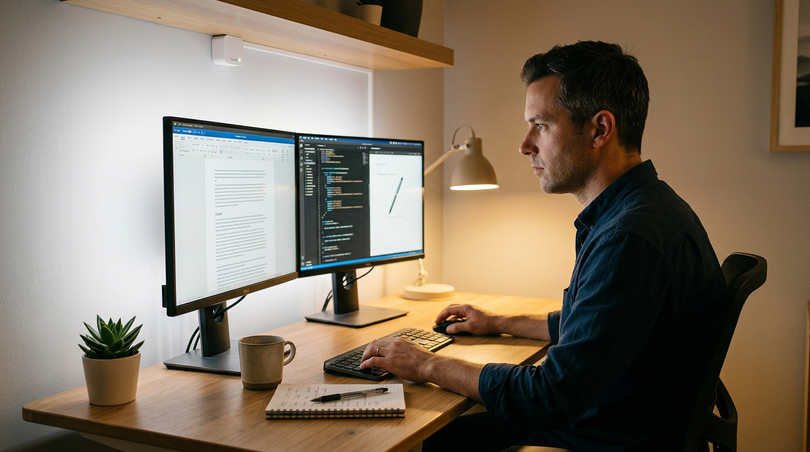
Home office and extended work sessions
The home office is arguably the use case where the cumulative benefits of bias lighting are most significant, and where the return on investment (in health, comfort, and productivity terms) is greatest. A full-time home office worker may spend 8–10 hours per day in front of one or more screens, five days per week. The visual fatigue accumulated over such a working day, multiplied across fifty working weeks per year, represents a very substantial chronic health burden that correct bias lighting meaningfully and measurably reduces.
For home office use, the tunable white approach is the recommended standard specification: 6500K cool white during the working day for alertness, chromatic neutrality, and visual acuity with automatic transition to 3000K in the evening (from approximately 19:00 or 20:00) to support natural melatonin onset and more restful sleep. The Tuya automation platform makes this transition programmable and automatic, configured once and running in the background indefinitely without user intervention. For home workers whose sleep quality has been affected by heavy evening screen use, this circadian lighting programme is one of the most evidence-based domestic interventions available.
The productivity dimension is equally significant. Occupational health research consistently demonstrates that reduced visual fatigue translates to higher cognitive performance in the second half of the working day, lower error rates in detail-oriented tasks, and higher self-assessed wellbeing at the end of the working day. For knowledge workers (designers, programmers, writers, analysts) who depend on sustained attention and accuracy for commercial output, a bias lighting system that prevents the afternoon cognitive fatigue associated with unergonomic screen environments pays its capital cost many times over in the course of a single working month.
Interior designers: bias lighting as a design element
For interior designers, bias lighting presents both a functional requirement and a significant design opportunity. The practical need to provide appropriate ambient illumination for screen-heavy living spaces, where large television screens are often the dominant visual element of a living room or media room, intersects with the aesthetic potential of indirect LED illumination to create spatial depth, define architectural features, and add warmth and character to contemporary interiors.
From a design perspective, television bias lighting is an element of the broader concept of architectural illumination, the use of built-in, recessed, or concealed light sources to define spatial quality without visible fittings. A television screen on a feature wall surrounded by a soft calibrated halo that grades into the surrounding surface is fundamentally different as a visual composition from the same screen surrounded by darkness. The halo creates a sense of intentionality, signalling that the screen is a designed element of the room, integrated into the architectural concept rather than appended to it, and it softens the visual dominance of a large screen by creating a luminous transition between screen and wall.
Wall colour has a significant interaction with the bias lighting effect that designers should account for. A neutral grey or off-white wall produces the purest representation of the bias light’s actual colour temperature. A strongly saturated wall (deep blue, rich green, terracotta red) modifies the appearance of the halo through simultaneous contrast, producing a colour shift in the direction complementary to the wall colour. Textured surfaces (exposed brick, rough plaster, timber cladding) interact with the raking bias light to reveal micro-relief, creating depth and material character that is amplified by the grazing-angle illumination. This texture-revealing effect can be an attractive design element in its own right, or can be managed by adjusting the clearance between screen and wall to control the angle of incidence of the light on the surface.
11. Aesthetic aspects and interior design
The aesthetic dimension of bias lighting is distinct from, but inseparable from, its functional dimension. A correctly specified system, COB strip, frosted diffuser, calibrated controller, produces an ambient halo that functions simultaneously as a professional ergonomic tool and as a designed light effect. The visual character of the halo is determined by three interacting variables: colour temperature (warm to cool), intensity (subtle to prominent), and light distribution (the pattern and evenness of the illuminated wall area).
Colour temperature and interior mood
Warm white (2700–3000K) bias lighting creates an intimate, domestic atmosphere that references candlelight and traditional incandescent illumination, deeply embedded in the cultural coding of home comfort in European tradition. It frames the screen as part of a comfortable living environment rather than a technical installation, cool white (6500K) creates a crisper, more cinematic atmosphere, the professional standard that associates with quality and precision. Neutral white (4000K) occupies the comfortable middle ground: neither aggressively cool nor overly warm, appropriate for mixed work-and-leisure environments where versatility matters more than atmosphere optimisation.
Intensity and spatial effect
At very low intensity (5–8% of screen brightness), the bias lighting is almost invisible except in a completely dark room, it provides the adaptation benefit while being unobtrusive as a design element. At the standard 10% level, it is a clearly present ambient feature, the halo is visible and spatially legible as a deliberate design choice, at higher intensities (15–25%), the halo becomes a prominent visual feature that significantly contributes to the room’s ambient light level, appropriate for scenarios where the bias lighting also serves a practical room illumination function. The smart controller’s scene recall function allows these intensity levels to be instantly switched, enabling the same installation to serve as discreet functional bias lighting during intensive viewing and as a prominent decorative accent during social occasions.
Bias lighting in period and contemporary interiors
For period interiors where the introduction of a modern screen represents a visual integration challenge, bias lighting provides a means of softening the screen’s visual dominance and relating it to the character of the space. A warm 2700K halo behind a screen set into a period-style chimneybreast surround or flanked by traditional bookcases creates a visual reference to firelight and candlelight that is harmonious with the room’s character. For contemporary interiors, particularly the dark feature walls and high-contrast material combinations that characterise contemporary European residential design, cool 6500K bias lighting creates a precisely calibrated technological aesthetic that reinforces the room’s modern design language. The LightingLine ultra-slim profiles, with their machined aluminium finish and minimal visual presence, are invisible once installed and leave the design expression entirely to the quality of the light.
12. Cost analysis and return on investment
| System level | Description | Capital cost (55″ TV, 4 sides) | Annual running cost | Expected lifetime | Lifetime material cost |
|---|---|---|---|---|---|
| Entry consumer | Basic SMD strip, tape mount, generic adapter | €15–30 | <€3 | 2–4 years | €60–120 (3 replacements) |
| Mid consumer | Ra90+ SMD or COB, basic profile, branded driver | €50–90 | <€4 | 5–8 years | €80–140 (1–2 replacements) |
| Professional fixed CCT | COB + SL08-03 + SLD-50-24 + WT1 | €100–150 | <€5 | 10–15+ years | €100–150 (no replacement needed) |
| Professional tunable white | CCT 240 led/m + SL08-03 + SLD-50-24 + V2-L(WB) | €140–200 | <€6 | 10–15+ years | €140–200 (no replacement needed) |
The running cost of a complete bias lighting installation is negligible. A four-sided LED strip installation for a 65″ television consumes approximately 8–15 watts in typical operation. At the average European household electricity rate of €0.25/kWh and 4 hours of daily operation, the annual electricity cost is €3–6. Over a 12-year lifetime, total electricity cost is €36–72 — trivially small relative to any other cost in the system.
The lifetime cost comparison strongly favours the professional specification. An entry-level system that costs €20 initially but requires replacement three times over the lifetime of a professional system accumulates a lifetime material cost of €60–120, delivers a significantly inferior experience throughout that period (lower CRI, poor uniformity, possible flicker, no smart control, no logarithmic dimming), and requires repeated installation time. A professional system at €140–200 represents one installation, one configuration, and over a decade of flicker-free, accurately calibrated, smart-controlled bias lighting, a lifetime value proposition that is clearly superior at any rational accounting of time, experience quality, and total cost.
For home office professionals, the productivity benefit alone justifies the investment. If bias lighting reduces daily visual fatigue by 25%, and this translates to even 1% higher productive output over an 8-hour working day, the annual productivity benefit at European knowledge worker rates exceeds the capital cost of the entire professional system within the first two weeks of use.
13. Smart home integration and future trends
Bias lighting is a natural candidate for smart home integration: its function, calibrated ambient illumination responding to viewing mode and time of day, is directly complementary to the smart home’s core purpose of managing the domestic environment intelligently and automatically.
Current integration capabilities (Tuya platform)
The Skydance controllers (WT1, V2-L(WB)) integrate with the Tuya Smart platform, providing: Amazon Alexa voice control (“Alexa, set cinema mode” activates a preset with 6500K at 10% intensity), Google Home integration via Google Assistant with full scene and automation support, Apple HomeKit integration via Tuya HomeKit bridge, automation and scheduling (bias light turns on when TV is switched on via smart socket monitoring, transitions to warmer CCT at evening time, switches off at scheduled bedtime) and scene creation (Cinema, Gaming, Work, Relax, Night stored as named scenes, instantly recallable via app, physical switch, or voice command).
Human-centric lighting and circadian programmes
The most significant emerging application of tunable white bias lighting is the implementation of circadian lighting programmes using Tuya automation. A professionally designed HCL programme for a home office workstation and viewing room might be configured as follows:
- 06:00–16:00: 6500K — daylight-matched, supporting alertness, focus, and accurate colour work
- 16:00–19:00: 4500K — beginning the transition to warmer light, maintaining visual performance while reducing blue content
- 19:00–21:00: 3000K — warm ambient, supporting melatonin onset, cinema mode retains D65 as an on-demand override
- 21:00–23:00: 2700K — maximum melatonin support, warm domestic character, most conducive to natural sleep onset
This programme requires configuration once and then runs automatically and indefinitely, adjusting the ambient light environment of the room to support biological rhythms without requiring any ongoing user attention. For individuals whose circadian rhythms are disrupted by heavy evening screen use, a clinical reality for a growing proportion of the working population, this circadian bias lighting programme represents one of the most practical, evidence-based, and cost-effective interventions available.
Matter: the future of smart lighting integration
The Matter protocol (the new universal smart home standard developed by the Connectivity Standards Alliance with participation from Apple, Google, Amazon, Samsung, and other major players) is in the process of transforming the smart home lighting ecosystem. Matter devices operate locally without cloud dependency, are interoperable across all major ecosystems without additional bridges, and maintain security and reliability standards that cloud-dependent protocols cannot match. Skydance controllers with Matter support will integrate directly with any Matter-compatible smart home hub or voice assistant (Apple Home, Google Home, Amazon Alexa, Samsung SmartThings, and others) natively and without fragmentation. LightingLine is monitoring the Matter ecosystem closely and will be adding Matter-compatible Skydance products to the catalogue as they become available.
14. Safety, standards and long-term reliability
The safety profile of a correctly specified LED bias lighting system is excellent. LED strips operating at 12V or 24V DC are classified as Safety Extra Low Voltage (SELV) systems under IEC 60364 and equivalent EU national standards. SELV systems operate below the threshold voltage (50V AC / 120V DC) above which electrical shock poses a significant hazard under dry conditions. The LED strips themselves, the only elements accessible to inadvertent touch in normal use, present no meaningful electrical shock risk.
The mains-voltage element, the Mean Well driver, is fully enclosed in a safety-rated housing and rated to protection class I or II as applicable. All Mean Well SLD series drivers carry the CE marking confirming conformity with EU low-voltage and EMC directives, plus optional CB, TUV, and UL certifications for specific markets. These certifications involve third-party laboratory testing against the relevant safety standards, they are not self-declarations.
Photobiological safety
LED light sources are subject to IEC/EN 62471 (Photobiological Safety of Lamps and Lamp Systems), which defines risk groups for potential retinal blue-light hazard and UV/IR radiation. All strips used in bias lighting applications are certified at Exempt or Risk Group 1, the lowest risk categories, confirming that the light output at relevant distances and intensities presents no measurable risk of photochemical retinal damage. The very low intensity of the bias lighting (directed away from the viewer, typically producing less than 100 nits at the wall surface) places the actual viewer exposure well below even the conservative Exempt group limits.
Thermal management and fire safety
The aluminium profiles serve a critical thermal management function: conducting heat from the LED chip junctions to the ambient air, maintaining chip temperatures within the design envelope. For the power densities typical of bias lighting (8–15W/m), the slim LightingLine profiles provide adequate thermal conductance to maintain rated chip temperatures even at 40°C ambient. Fire risk from the LED strip at these power densities is negligible, the total heat generated over a typical 3m installation is comparable to a single LED table lamp. The Mean Well drivers are designed for operation up to 70°C case temperature with built-in overtemperature protection. With adequate ventilation clearance (minimum 5cm on all sides), they operate well within their thermal design parameters under all normal bias lighting duty cycles.
Installation safety
The mains-voltage connections to the Mean Well driver, the only elements of the system at hazardous voltage, should be made by a qualified electrician in accordance with local wiring regulations (in the EU: IEC 60364, and the applicable national transposition). All low-voltage connections (driver DC output to controller to strip) can be made by any competent person following the instructions provided in this guide. In most EU member states, connection of a low-voltage LED lighting system to an existing switched mains socket (via the driver’s IEC inlet connector) does not require a qualified electrician, but it is advisable to have the mains connection verified by a competent person if there is any uncertainty about the suitability of the existing circuit.
15. Market data and industry research
| Metric | 2022 | 2024 | 2028 (Forecast) | Source |
|---|---|---|---|---|
| Global LED lighting market value | USD 75B | USD 89B | USD 130B (est.) | Mordor Intelligence / Grand View Research |
| Smart LED controller market CAGR | — | 19.4% p.a. | — | MarketsandMarkets 2024 |
| EU households with ≥1 smart lighting device | 14% | 22% | 38% (est.) | Statista European Smart Home Survey 2024 |
| Consumer awareness of bias lighting (US) | 31% | 47% | — | DisplayMate Survey 2024 |
| OLED TV market share (global premium TV) | 28% | 35% | 45% (est.) | DSCC / Omdia Panel Supply Chain 2024 |
| Screen users reporting visual fatigue | 66% | 71% | — | American Optometric Association 2024 |
| COB strip share of premium LED strip market | 18% | 34% | 55% (est.) | Yole Intelligence 2024 |
| Tunable white LED adoption (new residential) | 12% | 24% | 45% (est.) | LRC Lighting Research Centre 2024 |
Several trends in this data are directly relevant to the bias lighting market and to LightingLine’s ecosystem positioning:
- The rapid growth in OLED television adoption (35% and rising of premium TV sales) directly increases the addressable market for high-performance bias lighting, as OLED’s extreme contrast characteristics make bias lighting most critical for exactly this category of display.
- The rising prevalence of reported visual fatigue (71% of screen users, per AOA 2024) creates growing consumer awareness of the need for ergonomic screen environment interventions, of which calibrated bias lighting is the most evidence-supported and most directly actionable.
- The strong growth of COB LED strip market share (18% to a projected 55% of premium strip sales) reflects increasing consumer and professional sophistication in distinguishing between adequate and optimal LED light quality, a trend that strongly favours the COB ecosystem.
- The accelerating adoption of tunable white technology in new residential installations (from 12% to a projected 45%) reflects mainstream acceptance of HCL principles, translating in the bias lighting context into growing demand for CCT-adjustable systems that can serve both professional and circadian health use cases from a single installation.
16. Frequently Asked Questions
What is bias lighting?Bias lighting is indirect, low-luminance ambient illumination placed behind a display device (TV, monitor, or projector) and directed towards the wall or surface behind the screen, creating a soft calibrated halo that frames the display. The name derives from electronics: a bias signal sets a circuit’s operating point; bias lighting sets the luminous operating point of the viewing environment, establishing a non-zero ambient luminance baseline that reduces the conflicting adaptation demands on the human visual system. The professional standard is 10% of peak screen brightness at 6500K (D65), as specified in ITU-R BT.500 for professional viewing environments. Benefits: 20–40% reduction in measurable visual fatigue; improved perceived contrast and colour saturation; mitigation of OLED blooming perception; with tunable white systems, circadian health support through evening blue light reduction. |
Is bias lighting worth it for TV?Yes, unambiguously. The clinical evidence (Philips Research Labs, Journal of SID, NHK) documents 20–40% reductions in measurable visual fatigue after two-hour TV viewing sessions with correctly calibrated bias lighting vs. viewing in darkness. The improvement in perceived contrast and colour saturation is immediately noticeable. Running cost: under €5 per year. A professional LightingLine system for a 55–65″ TV costs €100–200 in materials with a 10–15+ year lifetime, representing total lifetime cost comparable to or lower than two or three replacements of a cheap consumer strip, while delivering a substantially superior experience throughout. For OLED TV owners, bias lighting is particularly critical: OLED’s true 0-nit black levels create the most extreme dark adaptation demands of any display technology, and bias lighting is the most direct and effective available mitigation. The question is not “is it worth it?” but “why wait?” |
Does bias lighting reduce eye strain?Yes, this is the most thoroughly documented benefit, supported by multiple independent research sources using both subjective and objective clinical measures. The mechanism: the visual system cannot simultaneously dark-adapt the peripheral retina (dark room) and light-adapt the foveal retina (bright screen). This irresolvable conflict produces continuous, low-level ocular muscle fatigue and retinal adaptation stress. Calibrated bias lighting at 10% screen brightness resolves the conflict by raising ambient luminance to a level consistent with a single moderate adaptation state. Objective research findings: 20–40% reduction in critical flicker fusion frequency (Philips Research Labs, 72 subjects); 28–35% reduction in Visual Fatigue Scale scores (Journal of SID, 120 subjects); 31% reduction in orbicularis oculi EMG tension (Display Ergonomics Research Group, 88 subjects). These are objectively measured physiological parameters, not self-report placebo effects. The benefit is greatest for OLED and HDR displays, where screen luminance peaks are highest and dark adaptation in dark scenes is most extreme. |
Does bias lighting work for OLED TVs? Is it necessary?Yes, it works and for OLED it is more necessary than for any other display technology. OLED achieves true 0-nit black levels, creating screen-to-room luminance ratios of up to 10,000:1 in dark viewing environments, the most extreme adaptation conflict the visual system routinely encounters in leisure activities. HDR viewing on OLED without bias lighting produces 40% higher measured visual fatigue than SDR viewing (NHK 2020 study), the HDR-specific fatigue excess that calibrated bias lighting effectively eliminates. Additionally, OLED’s absolute black makes blooming artefacts more perceptually visible in dark viewing conditions; bias lighting raises the visual detection threshold and makes bloom halos imperceptible or far less distracting. Practical conclusion: if you own an OLED TV and watch content in any dimmed environment, bias lighting is the single most impactful ergonomic step you can take, more important for OLED than for any other display type. |
What colour should bias lighting be? White, warm, or colour?White — specifically D65 (6500K) for professional and cinema applications. Virtually all modern televisions and monitors are calibrated to D65 as their reference white point. Matching the bias light to D65 ensures the eye’s chromatic adaptation is consistent with the display calibration, producing the most accurate colour perception and the full clinical benefits of adaptation stabilisation. Coloured bias lighting (RGB strips) shifts the eye’s chromatic adaptation away from D65, causing the screen image to appear subtly colour-shifted — acceptable for casual entertainment, counterproductive for colour-critical work. Warm white (2700–3000K) is appropriate for evening viewing where circadian impact takes priority over chromatic accuracy. The optimal solution for most users is a tunable white system covering 2700K–6500K: one installation, every use case — professional D65 for cinema and colour work, neutral for general use, warm for evening relaxation. Ledpoint F52-CCT-240D22 + Skydance V2-L(WB) is the recommended professional tunable white configuration. |
3 sides or 4 sides of bias lighting, which is correct?Four sides (top, bottom, left, right) is the professional standard: uniform halo illumination on all perimeter sides, consistent with cinema surround illumination design principles and ITU-R BT.500 methodology. Three sides (top, left, right — omitting bottom where physical access is limited by TV stand or wall bracket) delivers approximately 85–90% of the benefit of four-sided installation and is the recommended practical approach for most domestic scenarios. Two sides (top plus left and/or right) is the practical minimum for effective bias lighting. One side only is noticeably asymmetric and is not recommended as a permanent solution. Contribution order: top > left = right > bottom. The bottom edge contributes least because the inferior visual field has lower spatial resolution and floor-level illumination has less impact on central visual adaptation. For wall-mounted OLED TVs where bottom access is restricted, a three-sided installation using the ultra-slim LightingLine PR-SL13-02 profile is the recommended professional approach. |
Can you use a regular LED strip for bias lighting?Technically yes, but quality has a direct and significant impact on the effectiveness and safety of the system. For genuinely effective bias lighting, minimum specifications are: CRI Ra ≥ 90 (to avoid chromatic distortion of ambient illumination and reduced colour perception accuracy), CCT consistency <150K variation along the full strip length, flicker-free operation (constant-current driver or PWM above 1000Hz — IEEE P1789 compliant) and ideally COB technology for dot-free, uniform wall illumination. A typical cheap consumer LED strip, Ra 70–80, moderate consistency, powered by a simple switching adapter with significant 100Hz output ripple will produce some ambient luminance but will not deliver the full documented clinical benefits and may, through subliminal flicker, actually add a component of visual fatigue rather than reducing it. For the full professional benefit: COB strips (Ra ≥ 90, 6000K near-D65) in LightingLine ultra-slim aluminium profiles with Mean Well SLD-series flicker-free drivers. |
What is the best bias lighting for TV?The reference professional specification for a 55–65″ TV: strip led 6000K near-D65 COB, Ra ≥ 90 for fixed colour temperature, or strip CCT tunable white 2700K–6500K COB for maximum versatility; LightingLine SL08-03 8mm aluminium profile; LightingLine RD-03-FM2 frosted diffuser; Mean Well SLD-50-24 flicker-free driver (24V, ripple <1%, efficiency >89%); Skydance WT1 (fixed CCT) or Skydance V2-L(WB) (tunable CCT) smart controller with logarithmic dimming, Tuya/Alexa/Google Home integration. This system delivers: continuous dot-free COB illumination; professional D65 chromatic accuracy; zero perceptible flicker at all dim levels (IEEE P1789 compliant); smooth logarithmic dimming for precise 10% calibration; full smart home integration; and a rated lifetime exceeding 50,000 hours — over a decade of daily use without replacement. |
How do you set up bias lighting on a TV step by step?1. Measure TV perimeter (all 4 sides); order strip, profile, diffuser, driver, controller with 20% extra length. 2. Cut profiles to required lengths; deburr all cut faces. 3. Insert COB strip into profile channel (LEDs facing diffuser opening). 4. Cut strip only at printed cut marks. 5. Click frosted diffuser into profile. 6. Plan corner connections and cable routing to driver location. 7. Clean TV rear bezel with isopropyl alcohol; allow 2 min to dry. 8. Mount profiles with VHB 3M tape or mounting clips; allow 24h adhesive cure. 9. Connect strip sections at corners with soldered wire leads (preferred) or quality solderless clip connectors. 10. Connect: LED strip → Skydance controller → Mean Well driver → mains (mains connection by qualified electrician if required). 11. Power up; connect to Tuya Smart app; display full-screen white on TV; set CCT to 6500K; adjust brightness to 10% of screen brightness. 12. Create scenes (Cinema, Work, Relax) and configure automation schedules for time-of-day CCT transitions if using tunable white system. |
What is active bias lighting?Active bias lighting is a dynamic system that analyses the content being displayed in real time and adjusts the colour and brightness of the bias lighting to match or complement the on-screen image. Philips Ambilight (built into Philips televisions since 2004) is the most widely known commercial implementation. DIY equivalents use addressable RGB LED strips (WS2812B, SK6812), a Raspberry Pi or Arduino, and open-source software (Hyperion, HyperHDR, Prismatik) to sample edge pixels and project matching colours onto the surrounding wall. Active bias lighting creates an immersive entertainment surround effect popular among home theater enthusiasts. Its limitations: continuously changing colour prevents stable chromatic adaptation (can be fatiguing over long sessions); coloured illumination makes colour-critical evaluation impossible; technical setup and maintenance is significantly more complex than a white LED system. For entertainment: an engaging option. For colour-critical or professional applications: static white COB at D65 is the correct specification. Many users run both: a static white professional COB system as the primary bias lighting, and a secondary addressable RGB system for entertainment enhancement. |
Is bias lighting good for your eyes? Is it safe?Correctly implemented bias lighting is both beneficial for eye health and entirely safe. Safety: 12V/24V DC SELV voltage presents no shock hazard under normal conditions; LEDs must be certified at IEC 62471 Exempt or Risk Group 1 (no photobiological hazard at relevant distances and intensities); Mean Well SLD drivers are CE-certified and TUV-tested. Health benefits: 20–40% reduction in measurable visual fatigue; reduced incidence of viewing-related headaches; reduced severity of Computer Vision Syndrome symptoms; with tunable white implementations, reduced circadian rhythm disruption from evening screen use. Important caveat: quality of the driver is critical. A flickering driver (cheap switching adapters often have significant 100Hz output ripple) can introduce subliminal flicker that itself causes visual fatigue — the opposite of the intended benefit. The Mean Well SLD-series flicker-free driver eliminates this risk, producing output ripple below 1% at all operating conditions. With quality components properly installed, bias lighting is one of the most unambiguously beneficial ergonomic interventions available for screen users. |
What is the difference between bias lighting and a monitor light bar?They serve completely different functions and address different sources of visual discomfort. Bias lighting projects light backwards, onto the wall behind the screen, to reduce the luminance contrast between the bright display and its dark surround. The viewer does not see the bias light source directly, it is invisible except as an ambient halo on the wall. A monitor light bar projects light forward and downward onto the desk surface. It is a task light that illuminates the desk area in front of the monitor, reducing the contrast between the bright screen and a dark desk, a secondary but genuine source of visual fatigue in some work environments. The two approaches address different problems: rear bias lighting is the primary intervention for screen-related eye strain while a monitor light bar is a useful secondary tool for desk work. They can be and often should be used simultaneously. A bias light alone, without a monitor light bar, is the more important of the two for screen-related eye fatigue. A monitor light bar alone does not provide the luminance adaptation benefits that are the core mechanism of bias lighting. |
What temperature should bias lighting be? What is the best CCT?Professional standard: 6500K (D65) for cinema, HDTV, and display calibration applications — the ITU-R BT.709/BT.2020/sRGB reference white point. Best CCT by application: cinema and home theater → 6500K; professional colour grading and photography → 6500K (D65 exact, Ra97+ Sunlike); home office day work → 5000–6500K; home office evening → 3000–4000K; gaming (competitive) → 6500K; evening relaxation → 2700–3000K; photography editing → 6500K D65. For maximum versatility: a tunable white system covering 2700–6500K from a single installation — CCT-240D22 + Skydance V2-L(WB). This eliminates the need to choose a fixed CCT at installation time, allows optimal settings for any scenario at any time, and future-proofs the installation for evolving use cases. The circadian benefit of transitioning automatically from 6500K daytime to 2700K evening is achieved through Tuya automation scheduling without any ongoing user intervention. |
Does bias lighting help with OLED blooming?Yes, significantly, though it cannot eliminate blooming as a physical phenomenon. OLED blooming arises from optical scattering within the panel and its anti-reflection filter stack, and is unaffected by external illumination. What bias lighting can do, and does effectively, is reduce the perceptual visibility of blooming by maintaining the eye in a partially photopic (light-adapted) state, raising the visual detection threshold, and making the very low luminance of the bloom halo either imperceptible or far less distracting. In practice: blooming that is clearly visible and annoying in a completely dark room viewing environment may become essentially invisible with correctly calibrated bias lighting, without any change to display settings, calibration, or HDR performance. Multiple professional display calibrators associated with ISF and THX certification programmes have specifically recommended calibrated D65 bias lighting as the most practical non-invasive approach to managing OLED blooming perception for viewers who find it distracting. |
Is bias lighting good for a home office? For long computer work sessions?Yes, and the case is arguably stronger for home office use than for any other application, because of the greater duration and intensity of screen exposure. A full-time home office worker spending 8–10 hours per day before screens accumulates very significant visual fatigue without proper ambient illumination management. Bias lighting reduces this fatigue by 20–35%, with measurable positive impacts on cognitive performance, task accuracy, and end-of-day wellbeing. For home office applications, the tunable white specification is strongly recommended: 6500K cool white during working hours for alertness and chromatic accuracy; automatic transition to 2700–3000K warm white from approximately 19:00 for circadian health support. The Tuya automation platform handles the CCT transitions automatically according to a programmed schedule, requiring no ongoing user attention. The productivity benefit of reduced visual fatigue, even at the conservative estimate of 1% higher productive output, recovers the full capital cost of the professional system within the first few weeks of use for most knowledge workers. |
What is RGB bias lighting? Is it the same as bias lighting?RGB bias lighting uses red, green, and blue LED channels to produce coloured illumination, either a fixed colour or dynamically matched to the on-screen image. It is partially similar to static white bias lighting in that it provides ambient luminance behind the screen, reducing the luminance adaptation conflict between screen and surround. It differs in that the coloured illumination shifts the eye’s chromatic adaptation away from the D65 neutral state required for accurate colour perception, causing the screen image to appear subtly colour-shifted. For entertainment and mood: engaging and popular; provides partial bias lighting benefit. For colour-critical applications (photography, video editing, professional colour evaluation): actively counterproductive; static white at D65 is mandatory. For mixed-use scenarios: a tunable white system (warm to cool white) is generally preferable to a colour RGB system, as it provides both aesthetic versatility and chromatic accuracy without the complications of coloured ambient light management. If both entertainment RGB and professional white bias lighting are desired, they can be run as separate systems: addressable RGB for entertainment, COB white for professional use. |
17. Bias lighting for a safety vision
Bias lighting stands as one of the most evidence-supported, technically well-grounded, and practically accessible improvements any screen user can make to their visual environment. It is not a marketing concept or consumer gadget but it is a professional practice, validated by decades of broadcast engineering and display science, mandated by international standards bodies, and now available in high-quality consumer form at a cost that represents a fraction of the display it serves.
The visual science is clear: viewing a bright screen in a dark room places the human visual system under continuous, unresolved physiological stress. The iris oscillates between competing luminance demands. The retinal photoreceptors attempt to maintain two incompatible adaptation states simultaneously. Continuous adaptation conflict produces progressive fatigue, headache, and reduced contrast sensitivity: the accumulated burden of modern screen-heavy life. Bias lighting resolves this stress directly and elegantly. Clinical studies document 20–40% reductions in measurable visual fatigue after extended viewing sessions. Objective EMG measurements confirm 31% lower orbital muscle tension. The perceived contrast and colour saturation of the screen image improve substantially through the Simultaneous Contrast Effect. And for OLED television owners, whose displays achieve the most extreme luminance dynamic range of any consumer technology, bias lighting transforms the viewing experience from physiologically demanding to genuinely comfortable.
For those who are ready to build a professionally specified system, the LightingLine ecosystem, COB LED strips, LightingLine ultra-slim aluminium profiles, Skydance smart controllers with logarithmic dimming, and Mean Well flicker-free drivers, provides every component needed for a reference-quality bias lighting installation, specified and tested for the most demanding domestic and professional applications. Whether your installation is a 27-inch professional photography monitor, a 65-inch living room OLED television, an 85-inch dedicated home cinema screen, or a multi-display home office workstation, the complete professional solution exists in the LightingLine catalogue.
This article was developed with the support of artificial intelligence and subsequently reviewed, corrected, and validated by the LightingLine.eu technical team, which guarantees its reliability and compliance with official sources.