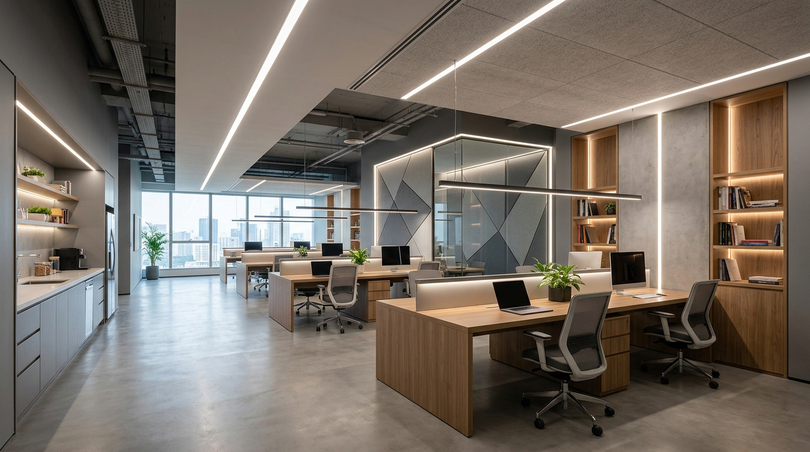
Walk into almost any workplace and the lighting will be the last thing anyone consciously notices and the first thing that quietly shapes how the day will feel. Office lighting is rarely discussed in board meetings, yet it governs concentration, mood, eye comfort, error rates and even the perceived professionalism of a company. A poorly lit office drains energy by mid-afternoon; a well-designed office lighting scheme keeps a team alert, comfortable and productive from the first coffee to the last email of the day.
This guide is written for the people who actually make these decisions: the office manager optimising an open-plan floor, the interior architect specifying a sustainable scheme, the HR lead worried about visual fatigue and staff wellbeing, and the business owner balancing image against operating cost. Throughout, we move from the science of office lighting to the precise components (LED strips, aluminium profiles and flicker-free drivers)0 that turn a drawing into a finished, glare-free workspace.
In this article…
- Why office lighting is the single most underrated workplace decision
- The importance of office lighting: productivity, wellbeing and health
- The science of lux, lumens and the working plane
- Types of office lighting: natural, LED, fluorescent and the modern hierarchy
- Office lighting standards, regulations and legal requirements
- Colour temperature: is 3000K, 4000K, 5000K or 6000K best for an office?
- The three-layer strategy: ambient, task and accent lighting
- Component specification 2026: profiles, strips and drivers
- Designing lighting for open-plan and small offices
- How to light a windowless or dark office
- Best lighting for computer work and screen-based tasks
- Tools, cutting and connecting LED strip and profile: the workshop guide
- Energy efficiency, daylight harvesting and smart control
- A step-by-step office lighting design process
- Office lighting trends for 2026
- Office lighting for every role: manager, architect, HR and owner
- Room-by-room office lighting
- Maintaining and troubleshooting office lighting
- The complete office lighting answer book
- Office lighting benchmarks and market context
- Office lighting masterclass: every scenario specified
- Frequently asked questions (FAQ)
- Building a future-proof office lighting scheme
Why office lighting is the single most underrated workplace decision
Modern office lighting has moved a long way from rows of buzzing fluorescent tubes. The discipline now sits at the intersection of architecture, human physiology and energy engineering. Getting it right is no longer a luxury, with the rise of hybrid work, an office has to actively justify the commute, and good office lighting is one of the most powerful, lowest-cost levers a business has. By the end of this article you will understand the layered design method, the lux and colour-temperature targets that matter, the components that deliver them, and exactly how to install office strip lighting cleanly using the correct profiles, tools and connection technique.
| Parameter | Recommended value (general office) |
|---|---|
| Illuminance at desk (working plane) | 500 lux |
| Colour temperature (workspaces) | 4000K neutral white |
| Colour rendering (CRI) | Ra ≥ 80 minimum, Ra ≥ 90–97 preferred |
| Unified glare rating (UGR) | ≤ 19 for screen work |
| Flicker | Flicker-free certified driver |
| Power supply headroom | +20% (1.2× safety rule) |
The importance of office lighting: productivity, wellbeing and health
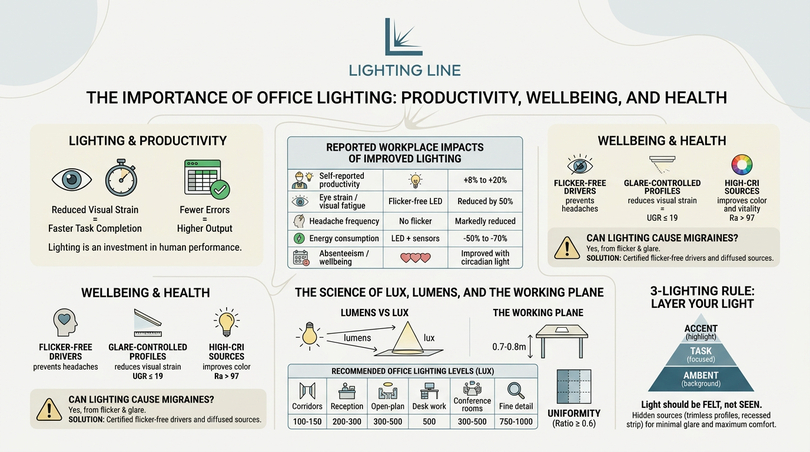
Before specifying a single fixture, it is worth understanding why office lighting deserves a place in any serious workplace strategy. Light is not merely a way to see but it is a biological signal, the human eye contains photoreceptors that regulate the circadian rhythm: the internal clock that governs alertness, mood and sleep. When the lighting in an office ignores this biology, the result is the familiar afternoon slump, sore eyes and a vague sense that the room is “tiring”. When the lighting respects it, the same room feels energising. This is the single most important reason good office lighting repays its modest cost many times over.
How office lighting affects productivity
Numerous workplace studies have measured the link between illumination and output, and the direction is consistent: better lighting raises measurable productivity. Tasks performed under appropriate light levels are completed faster and with fewer errors, because the visual system spends less effort resolving detail and more attention on the work itself. Under-lit offices force the eye to work harder, accelerating fatigue; over-lit, glaring offices create discomfort and headaches that pull focus away from the task.
The effect compounds across a workforce. A 1% improvement in concentration across a 50-person office, sustained over a year, dwarfs the entire cost of a lighting refurbishment. This is why office managers and business owners increasingly treat office lighting as an investment in human performance rather than a building expense. The most effective office lighting for an open-space environment combines uniform ambient light with adjustable task lighting at each desk, so individuals can tune their own working plane without affecting neighbours.
| Outcome measured | Typical reported improvement |
|---|---|
| Self-reported productivity | +8% to +20% after quality lighting upgrade |
| Eye strain / visual fatigue complaints | Reduced by up to 50% with flicker-free, glare-controlled LED |
| Headache frequency | Markedly reduced when flicker is eliminated |
| Energy consumption (vs fluorescent) | −50% to −70% with LED + sensors |
| Absenteeism / wellbeing scores | Improved with daylight-tuned circadian lighting |
How office lighting affects wellbeing and health
Wellbeing is where office lighting becomes a human-resources concern. Visual fatigue (dry, tired, aching eyes) is one of the most common workplace complaints, and the majority of cases trace back to two avoidable causes: flicker and glare. Cheap LED drivers and ageing fluorescent ballasts produce a rapid pulsing of light that the conscious mind may not register but the brain still processes, contributing to headaches and, for susceptible individuals, migraines. Eliminating flicker is therefore not a refinement, it is a baseline health requirement for any modern office.
Glare is the second culprit. Bright sources in the field of view, or harsh reflections bouncing off a monitor, force the pupil to constantly readjust. Controlling glare through diffused profiles and a sensible Unified Glare Rating (UGR ≤ 19 for screen work) makes a room visibly more comfortable. The third dimension is colour rendering: light that renders colours poorly makes a space feel grey and lifeless, while high-CRI light (especially full-spectrum Sunlike sources rated Ra > 97) keeps materials, skin tones and documents looking natural, reducing the subtle cognitive strain of working under “wrong” light all day.
For HR leaders, the message is simple. The healthiest office lighting is flicker-free, glare-controlled, high-CRI and tuned to a neutral 4000K colour temperature, with the option to warm or cool the space across the day to support natural circadian rhythms. This is precisely the kind of scheme the layered LED approach in this guide is built to deliver.
Can office lighting cause migraines?
Yes: and this is one of the most frequently searched concerns about workplace lighting. The mechanism is almost always flicker combined with glare. Older fluorescent fittings flicker at twice the mains frequency, and low-quality LED drivers can flicker far more aggressively through poor pulse-width modulation. For migraine-prone staff this is a genuine occupational trigger. The fix is twofold: specify certified flicker-free drivers and diffuse the light source so no bright point sits directly in the line of sight. When both are addressed, lighting-related migraine complaints typically fall away.
The science of lux, lumens and the working plane
Every conversation about office lighting levels eventually arrives at one word: lux. It is the single most important metric in lighting design, yet it is widely misunderstood but frequently confused with lumens, watts or brightness. This section sets out the science clearly and then converts it into the practical numbers an office actually needs.
Lumens vs lux: the crucial difference
A lumen measures the total quantity of visible light a source emits in all directions. A lux measures how much of that light actually lands on a surface: specifically, one lux equals one lumen spread over one square metre. The distinction matters enormously, a powerful fixture (high lumens) mounted on a high ceiling may deliver disappointing lux at the desk, while a modest source close to the working plane can deliver ample lux. Office lighting is specified in lux at the working plane, not in lumens at the fixture, because what counts is the light reaching the desk where the work happens.
The working plane is the horizontal surface where tasks occur: typically a desk at about 0.7–0.8 m above the floor. All office lux targets refer to illuminance measured at this height, not at the floor and not at the ceiling. This is why two offices with identical fittings can feel completely different: ceiling height, surface reflectance and fixture spacing all change how many lumens become useful lux at the desk.
How many lux should an office have?
This is the most asked question in office lighting design, and the answer is well established by lighting standards. General office work and computer-based tasks require 500 lux at the working plane. Areas with less demanding visual tasks need less, areas with fine detail need more. The table below gives the practical targets that underpin every specification in this guide.
| Office area / task | Maintained illuminance (lux) |
|---|---|
| Corridors and circulation | 100–150 lux |
| Reception / lobby | 200–300 lux |
| Filing, copying, archive | 300 lux |
| General open-plan office | 300–500 lux |
| Desk / computer work (primary) | 500 lux |
| Conference / meeting rooms | 300–500 lux (dimmable) |
| Technical drawing / fine detail | 750–1000 lux |
Converting lux to lumens for a real room
To translate a lux target into the lumen output you need to buy, lighting designers use a simplified relationship: required lumens ≈ target lux × floor area (m²) ÷ utilisation factor. The utilisation factor (typically 0.5–0.7 for a well-finished office) accounts for light lost to walls, fittings and maintenance depreciation. For example, a 20 m² office targeting 500 lux with a utilisation factor of 0.6 needs roughly 500 × 20 ÷ 0.6 ≈ 16,700 lumens of installed output. With efficient LED strip producing well over 120 lm/W, this is comfortably achievable within a modest power budget, a key advantage of LED office lighting over legacy systems.
The practical takeaway for non-specialists: do not chase a single bright fixture. Distribute the lumens evenly so the whole working plane reaches its lux target without bright spots and dark corners. Uniformity (the ratio of minimum to average illuminance) should ideally stay above 0.6 in a working area. This uniformity is exactly what continuous office strip lighting in profiles excels at delivering, compared with isolated downlights that create a “pool and shadow” pattern.
What is the 5:7 / 5’7″ lighting rule and the 3-lighting rule?
Several rules of thumb circulate in lighting discussions. The so-called “3 lighting rule” (or three-layer rule) is the principle that any well-designed space combines three layers of light
(ambient, task and accent) rather than relying on one. It is the backbone of the strategy in this guide. The golden rule of lighting is simply that light should be felt, not seen: the source is hidden, only its effect is visible, which is the entire philosophy behind trimless profiles and recessed strip. These rules are useful mental shortcuts, but they all reduce to the same discipline: layer the light, control the glare, and hit the lux target at the working plane.
Types of office lighting: natural, LED, fluorescent and the modern hierarchy
Office lighting covers a variety of technologies and roles, and choosing well means understanding what each type does best. This section maps the landscape (from daylight to the latest LED strip) and explains why the modern office has decisively moved toward LED while still treating natural light as the irreplaceable baseline. Knowing the strengths and weaknesses of each type of office lighting is the difference between a scheme that merely illuminates and one that genuinely supports the people working under it.
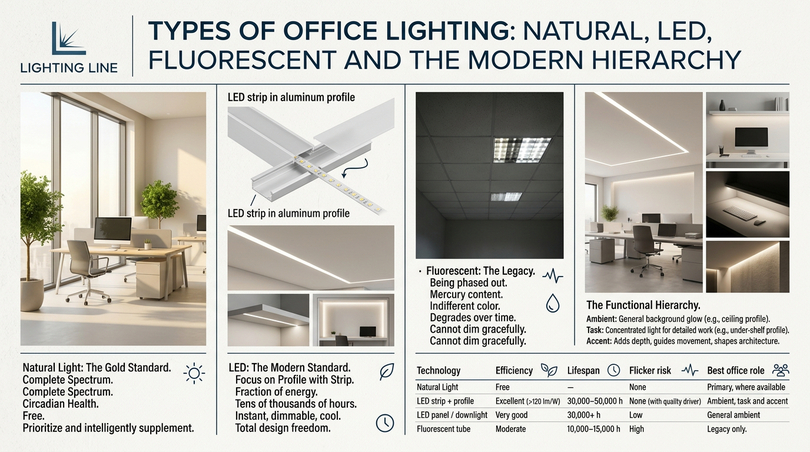
Natural light: the gold standard
No artificial source fully matches daylight. Natural light delivers a complete spectrum, supports circadian health and is free. The best office prioritises daylight and then supplements it intelligently, rather than fighting it. Desks should generally be placed perpendicular to windows to avoid both direct glare and silhouetting on screens, and electric lighting should be designed to top up daylight rather than duplicate it. There is, in most jurisdictions, no absolute legal requirement guaranteeing every workstation a window, but workplace regulations strongly favour access to natural light wherever reasonably practicable, and the wellbeing case is overwhelming.
Where daylight is abundant, the role of office lighting shifts to supplementation and uniformity such as filling shadows, balancing the room and maintaining the lux target as daylight fades. This is the ideal scenario for daylight-harvesting controls, discussed later, which dim the electric system automatically when the sun does the work.
LED: the modern standard for office lighting
LED is now the default for office lighting, and for good reason: LED office lights consume a fraction of the energy of older technologies, last tens of thousands of hours, switch instantly, dim smoothly, run cool and critically can be engineered into almost any form factor. The most architecturally powerful form is LED strip housed in aluminium profile: a continuous, diffused line of light that can be recessed into ceilings, run under shelving, or framed around a workspace. This is the technology at the heart of every recommendation in this guide, because it delivers the uniformity, glare control and design freedom that a modern office demands.
Are LED lights good for an office? Unequivocally yes. LED lighting is good for offices because it combines energy efficiency, long life, instant control and with quality drivers flicker-free operation. The caveat is quality: a cheap LED system can flicker and render colours poorly, undoing its own benefits. Specifying high-CRI strip and certified drivers is what separates a healthy LED office from a cheap one.
Fluorescent: the legacy technology being phased out
For decades the stereotypical office light was the recessed fluorescent panel and its weaknesses are exactly why offices are leaving it behind. Fluorescent tubes flicker, contain mercury, render colours indifferently, degrade over time and cannot dim gracefully. Many businesses still use fluorescent lighting simply because it is already installed, not because it is good. As regulations phase out certain fluorescent tubes and LED prices fall, replacing fluorescent office lighting with LED has become one of the highest-return upgrades available, improving comfort and cutting energy bills simultaneously.
The functional hierarchy: ambient, task and accent
Beyond the technology, office lighting divides into three functional roles, and a complete scheme uses all three. Ambient lighting provides the general background illumination that fills the room. Task lighting delivers concentrated light exactly where detailed work happens: the desk, the conference table, the reception counter. Accent lighting adds depth, guides movement and shapes the architecture, lifting a space from merely functional to genuinely considered.
| Technology | Efficiency | Lifespan | Flicker risk | Best office role |
|---|---|---|---|---|
| Daylight | Free | — | None | Primary, where available |
| LED strip + profile | Excellent (>120 lm/W) | 30,000–50,000 h | None (with quality driver) | Ambient, task and accent |
| LED panel / downlight | Very good | 30,000+ h | Low | General ambient |
| Fluorescent tube | Moderate | 10,000–15,000 h | High | Legacy only |
Office lighting standards, regulations and legal requirements
Whatever the aesthetic ambition of a scheme, office lighting must meet established standards. These are not bureaucratic obstacles; they are the distilled consensus of decades of vision research, and they protect both staff comfort and the employer from liability. This section sets out the standards that govern office lighting levels, glare and uniformity, and clarifies the legal landscape so managers and architects can specify with confidence.
The core European standard: EN 12464-1
Across Europe, the governing reference for indoor workplace lighting is EN 12464-1, “Light and lighting — Lighting of work places”. It defines, for every task and area, three linked requirements: the maintained illuminance (the lux that must be sustained over time, not just on day one), the maximum Unified Glare Rating (UGR), and the minimum colour rendering (CRI). For typical office work the standard sets 500 lux maintained, UGR ≤ 19, and CRI Ra ≥ 80. These three numbers are the practical specification for almost every office workstation and recur throughout this guide.
| Area / task | Lux | Max UGR | Min CRI (Ra) |
|---|---|---|---|
| Writing, typing, reading, data | 500 | 19 | 80 |
| Conference / meeting rooms | 500 | 19 | 80 |
| Reception desk | 300 | 22 | 80 |
| Archives / filing | 200 | 25 | 80 |
| Technical drawing | 750 | 16 | 80 |
What is UGR and why it matters for screen work
UGR (Unified Glare Rating) is the measure of discomfort glare from a lighting installation, on a scale where lower is better. For office screen work the target is UGR ≤ 19: this single requirement is why bright, bare LED point sources are unsuitable for offices and why diffused, recessed strip in profile is so well suited: by spreading the emitting surface and hiding the source, a profiled strip keeps luminance low and glare comfortably within limits. When staff complain that lights are “too bright” or “harsh”, the underlying problem is almost always a UGR failure, not raw lux.
Legal requirements and the employer’s duty
Workplace health-and-safety legislation across the UK and EU places a general duty on employers to provide suitable and sufficient lighting for the work being done, with an emphasis on natural light wherever practicable. The standards above (EN 12464-1, and in the UK the guidance built on it) are the accepted means of demonstrating compliance. While there is rarely a hard rule that every desk must have a window, there is a clear obligation that lighting must not endanger health or cause undue fatigue which is precisely why flicker, glare and inadequate lux levels can become genuine compliance issues, not just comfort preferences.
For the business owner and office manager, the practical reading is straightforward: specify to 500 lux, UGR ≤ 19 and CRI ≥ 80 as a minimum, eliminate flicker, and you will both satisfy the regulations and deliver a demonstrably comfortable workplace. Aiming higher (CRI Ra > 90, and tunable circadian control) moves a scheme from compliant to genuinely best-in-class.
Colour temperature: is 3000K, 4000K, 5000K or 6000K best for an office?
Few office lighting decisions generate more debate than colour temperature. Should the office be warm and inviting or cool and crisp? The answer is grounded in how colour temperature affects alertness, and it is one of the most powerful tools a designer has for shaping how a workspace feels and performs. This section settles the question with clear guidance for each office zone.
Understanding colour temperature (Kelvin)
Colour temperature, measured in Kelvin (K), describes whether light appears warm (yellowish) or cool (bluish). Warm white (around 2700–3000K) feels relaxed and homely. Neutral white (around 4000K) is balanced, crisp and businesslike. Cool white / daylight (5000–6500K) is bright and stimulating but can feel clinical. Crucially, cooler light suppresses the sleep hormone melatonin and raises alertness, while warmer light is calming which is exactly why the choice should follow the function of each space.
The verdict for workspaces: 4000K
For office workspaces, 4000K neutral white is the optimal choice. It strikes the balance between the alertness benefit of cooler light and the comfort of warmer tones, enhancing contrast and concentration without the clinical harshness of 5000–6500K. This is why almost every professional office lighting design specifies 4000K as the workspace default. I you are asking if is 4000K or 3000K better for an office the answer for desks and open-plan areas is firmly 4000K. 3000K is reserved for break-out and reception zones. Similarly 4000K wins for all-day comfort, while 5000K is generally too cold for sustained office work and better suited to industrial inspection tasks.
| Zone | Colour temperature | Reason |
|---|---|---|
| Open-plan workstations | 4000K | Alertness + comfort balance |
| Computer / detailed work | 4000K | Contrast without harshness |
| Reception / lobby | 3000K | Welcoming first impression |
| Break-out / lounge | 2700–3000K | Relaxed atmosphere |
| Conference (tunable) | 3000–4000K | Adapt to meeting vs presentation |
Warm or cool, soft white or daylight?
The common phrasings should office lighting be warm or cool, or is soft white or daylight better all resolve to the same principle: cool/neutral for working, warm for resting. Soft white (around 3000K) is better for relaxed zones; “daylight” (5000K+) is rarely ideal for sustained office work because its blue-heavy spectrum, while energising in short bursts, becomes fatiguing over an eight-hour day. The genuinely best modern answer, however, is not a fixed temperature at all but tunable white: a system that shifts from cooler, energising light in the morning to warmer tones in the afternoon, mirroring the natural day and supporting circadian health. This human-centric approach is rapidly becoming the benchmark for premium office specifications.
The role of CRI alongside colour temperature
Colour temperature describes the tint of white light while CRI (Colour Rendering Index) describes how faithfully that light reveals colours. A space can be the perfect 4000K yet still look dull if the CRI is low. For offices, CRI Ra ≥ 80 is the minimum, but the difference at Ra ≥ 90 and especially with full-spectrum Sunlike strip at Ra > 97 is immediately visible: documents look crisper, materials look true, and the whole environment feels more natural and less tiring. The healthiest, best-rendering office combines 4000K neutral white with the highest practical CRI, and the component choices later in this guide are selected precisely to hit both targets at once.
The three-layer strategy: ambient, task and accent lighting
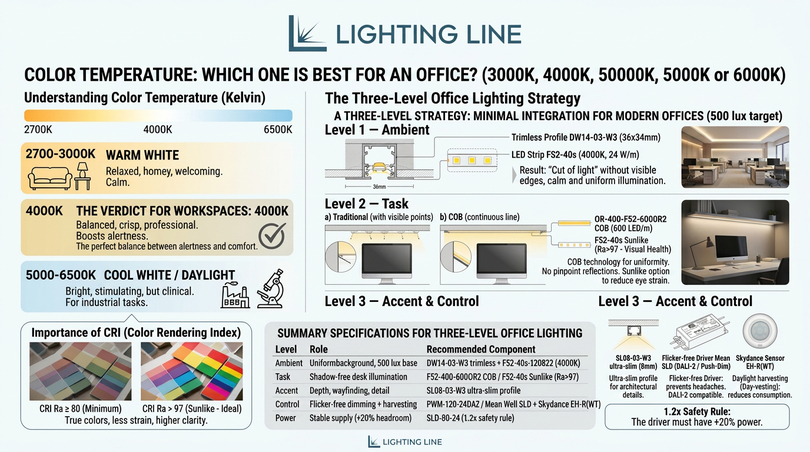
This is the heart of professional office lighting design. Every great workspace is built not from a single light source but from three coordinated layers working together. Effective office lighting requires a multi-layered strategy that integrates ambient, task and accent lighting to ensure visual comfort and high productivity. For 2026, the specification of components focuses on high-efficiency sources and invisible architectural integration to meet the required 500 lux threshold for office workspaces. The sections below walk through each layer and name the exact LightingLine components that deliver it.
Layer 1 — Ambient lighting with trimless integration
The foundation of a modern office environment is clean, uniform ambient light. This is the layer that fills the room and establishes the baseline lux level; everything else builds on top of it. The contemporary approach hides the source entirely so that the architecture itself appears to glow.
The profile
Trimless profiles like the DW14-03-W3 (36×34 mm) are engineered to be plastered directly into drywall ceilings. This creates a seamless “cut of light” that defines the architecture without visible hardware the embodiment of the golden rule that light should be felt, not seen. The result is a calm, sourceless wash of ambient illumination with no bright fittings to raise the glare rating.
The strip
For general areas, the Performance series is the technical choice. Strips like 4000K, 24 W/m provide high lumen output with a clean natural white colour temperature, which enhances contrast and alertness in professional settings. The 4000K neutral white aligns exactly with the workspace recommendation established earlier, making this strip an ideal ambient engine for an open-plan floor.
Layer 2 — Precision task lighting with COB technology
Workstations and conference tables require shadow-free illumination. To avoid the dotted reflection on monitors or polished desks, COB (Chip On Board) technology is essential. Where traditional strip shows individual LED points (which mirror unpleasantly in screens and glossy surfaces) COB strip presents a continuous, uniform line of light, the single most important upgrade for screen-based task lighting.
The strip
The OR-400-F52-600OR2 strip (600 LED/m) offers an absolute uniformity of light, appearing as a continuous ribbon even when installed in shallow profiles. This makes it the definitive choice for desk-edge, under-shelf and over-monitor task lighting where any visible dotting would reflect into the user’s eyes.
Visual comfort
For high-end office specifications, the Sunlike series is recommended. With a CRI Ra > 97, these strips mimic the full solar spectrum, reducing eye strain during long working hours and accurately rendering the colours of office materials. This is the strip to specify when the brief calls for the healthiest possible light: the closest artificial approximation of daylight, ideal for windowless offices and for any environment where staff wellbeing is a priority.
Layer 3 — Accent lighting and intelligent control
Accent lighting defines volumes and guides movement in corridors and common areas. It is the layer that turns a merely functional office into a designed one, adding depth and signalling care in the workplace environment.
Ultra-slim profiles
Profiles such as the SL08-03-W3 (only 8 mm high) are ideal for under-shelf lighting or cabinet integration. Their minimal height lets light be tucked into the thinnest architectural details — shelf edges, reveals and joinery — where a conventional fitting could never go.
Intelligent driver specification
Reliable office lighting must be flicker-free to prevent headaches and support high-quality video conferencing. The Mean Well SLD series (Slim Linear Design) are certified flicker-free drivers that fit perfectly into narrow architectural gaps while supporting DALI-2 or Push-Dim protocols. This directly addresses the migraine and eye-strain concerns raised earlier: by eliminating flicker at the driver, the entire scheme becomes physiologically comfortable, and the DALI-2 compatibility opens the door to the smart control discussed below.
Daylight harvesting and sensor integration
To maximise energy efficiency, the office system should include daylight sensors that adjust brightness based on ambient light levels (twilight harvesting). Devices like the Skydance EH-R(WT) can manage a 0/1-10V signal to dim the lights automatically when natural light is sufficient, maintaining the targeted lux levels while reducing carbon emissions. This is the mechanism that lets a daylight-rich office honour both its 500 lux target and its sustainability goals at the same time — the lights quietly fade as the sun rises and brighten as it sets, so the working plane stays constant while energy use drops.
When specifying the power system, always apply the 1.2× safety rule: the rated power of the constant voltage supply should be at least 20% higher than the total load of the LED strips to ensure long-term stability and system longevity. Running a power supply at its absolute limit shortens its life and risks instability: the 20% headroom is the single most important reliability rule in any LED strip installation.
| Layer | Role | Recommended component |
|---|---|---|
| Ambient | Uniform background, 500 lux base | DW14-03-W3 trimless + F52-40s-120822 (4000K) |
| Task | Shadow-free desk illumination | F52-400-600OR2 COB / F52-40s Sunlike (Ra>97) |
| Accent | Depth, wayfinding, detail | SL08-03-W3 ultra-slim profile |
| Control | Flicker-free dimming + harvesting | PWM-120-24DA2 / Mean Well SLD + Skydance EH-R(WT) |
| Power | Stable supply (+20% headroom) | SLD-80-24 (1.2× safety rule) |
Component specification 2026: profiles, strips and drivers
Having established the three-layer strategy, this section goes deeper into the components themselves, because the quality of an office lighting scheme lives or dies on the specification detail. Choosing the right profile, the right strip and the right driver and matching them correctly is what turns a good design into a flawless, decade-long installation.
Understanding aluminium profiles for office strip lighting
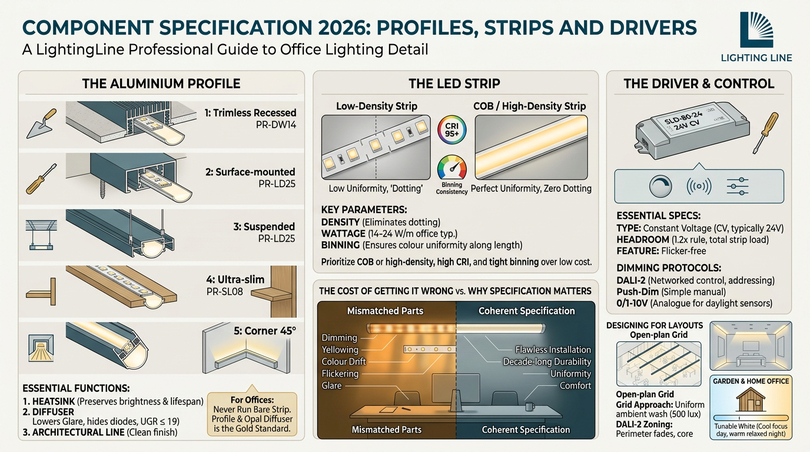
An aluminium profile (also called a channel or extrusion) does three jobs at once, and each is essential for office use. First, it acts as a heatsink, drawing heat away from the LED strip to preserve brightness and lifespan: LEDs that run hot fade and fail early. Second, its diffuser spreads and softens the light, hiding the individual diodes and dramatically lowering glare to meet the UGR ≤ 19 office requirement. Third, it provides a clean, finished architectural line. For office strip lighting, never run bare strip: the profile is what makes the difference between a professional installation and an amateur one.
| Profile type | Mounting | Best office use |
|---|---|---|
| Trimless / recessed (PR-DW14) | Plastered into ceiling | Seamless ambient “cut of light” |
| Surface-mounted | Screwed to surface | Retrofit ambient lines |
| Suspended / pendant | Cable-hung | Linear over desks/tables |
| Ultra-slim (PR-SL08, 8 mm) | Joinery / shelf edge | Accent + under-cabinet task |
| Corner (45°) | Internal corner | Indirect wall-wash accent |
Choosing the right diffuser
The diffuser cover is more important than most people realise. A frosted/opal diffuser hides the LEDs and produces a soft, even line: the right choice for almost all office work because it controls glare. A clear diffuser maximises output but reveals the diodes, so it suits only high-mounted indirect positions. For desks and any strip in the field of view, always specify an opal diffuser. When paired with COB strip, an opal diffuser produces a perfectly continuous ribbon with zero visible dotting: the gold standard for office task lighting.
Selecting LED strip: density, wattage and binning
Three strip parameters drive office quality. LED density (LEDs per metre, or continuous COB) determines uniformity: higher density, or COB, eliminates dotting. Wattage per metre determines output: for ambient office lines, 14–24 W/m is typical. Colour consistency (binning) determines whether every metre matches: cheap strip shows visible colour variation along its length, which looks unprofessional in a continuous office run. LightingLine’s Performance and Sunlike series are tightly binned, so long continuous runs stay uniform. The headline rule: for offices, prioritise COB or high-density strip with high CRI and tight binning over raw cheapness.
Drivers and the difference between constant voltage and constant current
LED strip almost always runs on constant-voltage (CV) drivers, typically 24 V, which is why supplies like the SLD-80-24 are specified. The driver must be matched to the total strip load with the 1.2× headroom rule, and for offices it must be flicker-free and dimmable via a recognised protocol. DALI-2 is the professional standard for networked office control, allowing individual fittings or zones to be addressed and scheduled, Push-Dim offers simple manual dimming from a standard wall switch and 0/1-10V is the analogue signal used by many daylight sensors.
Why this matters: the cost of getting it wrong
A scheme assembled from mismatched, low-quality parts fails in predictable ways: the strip dims and yellows as undersized drivers overheat, the colour drifts metre to metre, the cheap driver flickers and the bare strip glares. Each fault undermines the very productivity and wellbeing benefits the office invested in. Specifying coherently: quality strip, correct profile, certified driver, 20% power headroom is not an indulgence, it is the only way to realise the gains this guide describes.
Designing lighting for open-plan and small offices
Office layouts vary enormously, and the best office lighting design adapts to the space rather than imposing a single template. This section addresses the two most common configurations: the large open-plan floor and the compact small office and explains how the three-layer strategy flexes to suit each. Whether the brief is an open-space technology floor or a two-person studio, the principles of uniformity, glare control and layered light hold, only the execution changes.
Lighting the open-plan office
The defining challenge of open-plan office lighting design is uniformity across a large area shared by many people with different tasks and preferences. The most effective approach is a grid of continuous linear runs (suspended or recessed strip in profile) providing an even ambient wash at 500 lux, supplemented by individually controllable task lighting at each workstation. Continuous lines outperform isolated downlights here because they avoid the “bright pool, dark gap” pattern that makes open offices feel patchy and tiring.
Suspended linear profiles running parallel to the desk rows, ideally perpendicular to the windows, distribute light evenly while doubling as an architectural feature. Crucially, in a large shared space, zoned control via DALI-2 lets different areas dim independently: the daylit perimeter can fade while the core stays bright, and meeting zones can switch to presentation mode without affecting the whole floor. This zoning is what makes a large office both comfortable and energy-efficient.
Lighting the small office
A small office faces the opposite challenge: making a compact space feel open, bright and uncramped without over-lighting it. Here the layered approach is even more valuable, because a single harsh ceiling fixture in a small room creates glare and oppressive shadows. The recommended small office lighting design uses a slim recessed or surface ambient line for the base layer, a focused task strip at the desk, and a touch of accent (perhaps an ultra-slim profile washing one wall) to add perceived depth and make the room feel larger than it is.
In a small office, indirect light is the secret weapon: bouncing light off the ceiling or a wall softens the entire room and removes the cave-like feeling of a single downlight. Pair this with a 4000K neutral white to keep the space crisp and alert, and the smallest office can feel as professional and comfortable as a large one.
The garden office and home office
The rise of remote and hybrid work has made the home office and garden office serious lighting projects in their own right. A garden office, often a standalone structure, benefits hugely from the same layered LED strip approach: recessed ambient lines, a high-CRI task strip over the desk, and warm accent for the after-hours atmosphere. Because these spaces frequently double as evening retreats, tunable white is especially valuable: cool and focused by day, warm and relaxed by night. The best home office lighting applies exactly the office principles set out here at domestic scale: 500 lux on the desk, 4000K, flicker-free, high CRI, with task and accent layers that a single ceiling bulb can never match.
| Layout | Ambient approach | Key tactic |
|---|---|---|
| Open-plan | Continuous linear grid, 500 lux | DALI zoning + per-desk task |
| Small office | Slim ambient line + indirect bounce | Wall-wash for perceived space |
| Home / garden office | Recessed ambient + desk task | Tunable white day/night |
| Conference room | Dimmable linear, 300–500 lux | Scene control for presentations |
How to light a windowless or dark office
One of the most searched problems in office lighting is the windowless or persistently dark office: an interior room, a basement floor, or a workstation far from any glazing. Without daylight, the artificial scheme must do everything: deliver the lux target, render colours faithfully, and replace the circadian cues the body would otherwise get from the sun. This is where the difference between ordinary and excellent office lighting becomes most stark.
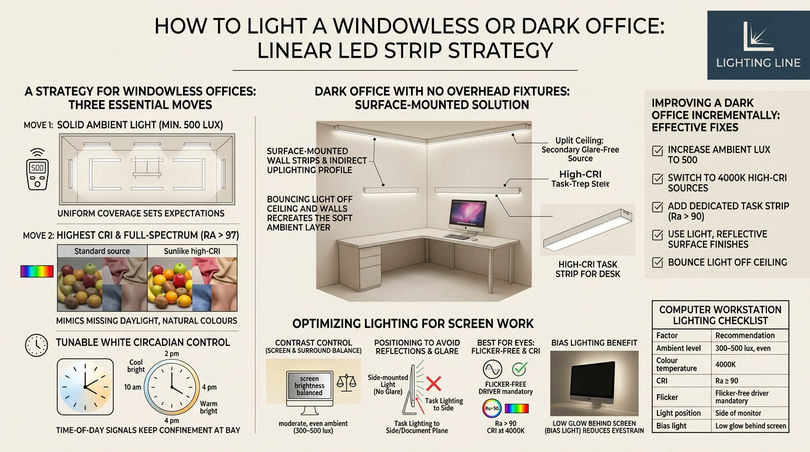
The strategy for a windowless office
The answer to how to light an office with no windows rests on three moves. First, hit a solid 500 lux of uniform ambient light so the room never feels gloomy: windowless rooms tend to be under-lit because there is no daylight to set expectations. Second, specify the highest possible CRI: full-spectrum Sunlike strip at Ra > 97 is the single best choice for a windowless office because it most closely mimics the missing daylight, keeping colours and skin tones natural and reducing the sense of confinement. Third, and most powerfully, deploy tunable white circadian control so the artificial light shifts through the day exactly as daylight would (cooler and brighter mid-morning, warmer and softer toward evening) giving the body the time-of-day signal it lacks.
Lighting a dark office without overhead fixtures
A related challenge is the office with no overhead lighting: perhaps a converted space or a tenancy where the ceiling cannot be altered. Here, surface-mounted and suspended strip profiles, plus indirect uplighting that bounces off the ceiling, recreate the soft ambient layer without recessing anything. An uplit ceiling becomes a large, glare-free secondary source, and high-CRI task strip handles the desk. This indirect approach also answers the frequent question of how to improve harsh office lighting: replace direct glare with bounced, diffused light and the harshness disappears.
Improving a dark office you already have
If the room exists and feels dark, the fixes are incremental and effective: increase ambient lux to 500, switch to 4000K high-CRI sources, add a dedicated task strip at each desk, use light, reflective surface finishes to multiply the available light, and bounce light off the ceiling. Together these turn a dim, oppressive room into a bright, comfortable workspace and every one of them is achievable with the LED strip and profile system at the centre of this guide.
Best lighting for computer work and screen-based tasks
The modern office is a screen office, and that changes the lighting brief. The best office lighting for computer work is not simply the brightest: it is the lighting that balances the screen against its surroundings, eliminates reflections, and protects the eyes through a long day of focused viewing. This section sets out exactly how to light a screen-based workstation, the configuration that now describes the overwhelming majority of office jobs.
The screen-and-surround balance
The central principle of lighting for computer work is contrast control: a bright screen against a dark room forces the eye to constantly readjust between the two, causing fatigue, an over-lit room washes out the screen and creates reflections. The goal is a moderate, even ambient level (around 300–500 lux) that sits comfortably alongside screen brightness, with no light source bright enough to reflect off the monitor into the user’s eyes. This is precisely why diffused strip in profile beats bare point sources for screen work: the spread, low-luminance emission produces no harsh reflections.
Positioning to avoid reflections and glare
Position matters as much as the fixture: light sources and windows should be to the side of the monitor, never directly behind it (which silhouettes the screen and dazzles the user) or directly in front (which reflects into the screen). Task lighting should illuminate the desk and documents without spilling onto the monitor face, a side-mounted or overhead-diffused arrangement keeps the working plane bright while leaving the screen reflection-free. For dual-monitor and standing-desk setups, a continuous suspended linear run above the desk gives even coverage regardless of how the equipment is arranged.
The best lighting for the eyes during screen work
The question of the best office lighting for the eyes recurs constantly, and the evidence points to a consistent answer: flicker-free, glare-controlled, high-CRI 4000K light, layered so there are no harsh shadows or bright sources in view. Flicker is the most damaging factor for screen workers, because the eye is already working hard, a flickering source compounds the strain and triggers headaches. High CRI keeps everything the eye looks at (screen, documents, surroundings) rendering naturally, reducing the subtle effort of interpreting wrong colour. And a touch of bias lighting behind a monitor (a low-level glow on the wall behind the screen) measurably reduces eye strain by softening the contrast between a bright screen and a dark wall, an easy win delivered by a single accent strip.
| Factor | Recommendation |
|---|---|
| Ambient level | 300–500 lux, even |
| Colour temperature | 4000K |
| CRI | Ra ≥ 90 |
| Flicker | Flicker-free driver mandatory |
| Light position | Side of monitor, never front/back |
| Bias light | Low glow behind screen |
Tools, cutting and connecting LED strip and profile: the workshop guide
A specification is only as good as its installation, and this is where many office strip lighting projects falter. Cutting a strip at the wrong point, connecting it badly, or mismatching the profile leads to dead sections, flicker and failures that look like a product fault but are really an installation error. This section is the practical, step-by-step workshop guide to working with LED strip and aluminium profile correctly: the knowledge that separates a clean, lasting office installation from a frustrating one. Each strip and profile type behaves a little differently, so the correct technique is set out for each.
The tools you need
Working with LED strip and profile requires a modest, specific toolkit. Assemble these before starting, because improvising mid-job is where mistakes happen.
| Tool | Purpose |
|---|---|
| Sharp fine scissors | Cutting strip cleanly on the marked line |
| Mitre saw / hacksaw + mitre box | Cutting aluminium profile square or at 45° |
| Fine metal file | Deburring cut profile ends |
| Soldering iron + solder (or solderless clips) | Connecting strip ends reliably |
| Multimeter | Checking polarity and continuity |
| Isopropyl alcohol + cloth | Cleaning the surface before adhesion |
| Tape measure & pencil | Accurate measuring and marking |
Step 1 — Measure and plan before cutting anything
Measure the run twice and plan the strip layout against the maximum run length the strip and driver allow. The single most common installation error is exceeding the maximum run length, which causes voltage drop, the far end of a long strip appears noticeably dimmer. For 24V strip, runs are longer than 12V, but every strip has a stated maximum; beyond it, the strip must be re-injected with power at intervals rather than chained end-to-end. Plan power injection points before cutting.
Step 2 — Cutting LED strip correctly
LED strip can only be cut at the marked cut points: visible scissor symbols or lines spaced along the strip (typically every 25–100 mm depending on type). Cutting anywhere else destroys the segment between the nearest cut points. Lay the strip flat, line the scissors up exactly on the printed line, and cut in a single clean stroke straight across the copper pads. Never cut between the pads, and never cut a strip while it is powered. For COB strip, the cut points are closely spaced, giving great flexibility, for high-density SMD strip, respect the wider intervals.
Step 3 — Cutting the aluminium profile
Cut the profile to length with a fine-tooth hacksaw in a mitre box, or a mitre saw with a non-ferrous blade. Use a square 90° cut for straight runs and end caps, and a 45° mitre for corners where two profiles meet, a clean mitre joint is what makes a profile run look professionally fitted. After cutting, always deburr the cut end with a fine file: a burr will prevent the diffuser and end cap from seating cleanly and can snag the strip. Test-fit the diffuser before mounting.
Step 4 — Connecting strips: solder vs solderless
There are two ways to join strip sections or attach lead wires, and the right choice depends on the office context. Soldering is the most reliable, lowest-resistance connection and is preferred for permanent commercial installations: tin the copper pads, tin the wire, and join with a brief touch of the iron, observing polarity (+ to +, − to −). Solderless connector clips are faster and tool-light, ideal for retrofit or where soldering is impractical, but they demand a perfectly square cut and clean pads to seat properly: a poor clip connection is a leading cause of flicker and dead sections. Whichever method, respect polarity, reversing it leaves the strip dead and keep joints accessible for maintenance.
Step 5 — Mounting strip into the profile
Clean the inside of the profile with isopropyl alcohol so the strip’s adhesive bonds properly, then peel and press the strip in firmly along its length, keeping it centred and straight. For COB strip in shallow profiles like the ultra-slim PR-SL08, take extra care to seat it flat so the continuous line stays even. Clip in the diffuser, fit the end caps, and the run is ready to mount. Press the strip down progressively rather than all at once to avoid trapping air bubbles or kinks that would show through the diffuser.
Step 6 — Powering and testing
Wire the strip to the driver observing polarity, apply the 1.2× power headroom rule so the driver is loaded to no more than ~80% of its rating, and test the full run before final fixing. Check the far end matches the near end (no voltage-drop dimming), confirm there is no flicker, and verify any dimming or DALI control responds correctly. Testing before you close up the ceiling or joinery saves hours of rework. Only once the run is confirmed perfect should the profile be permanently fixed in place.
Common mistakes and how to avoid them
| Mistake | Result | Prevention |
|---|---|---|
| Cutting off-mark | Dead segment | Cut only on printed lines |
| Exceeding max run | Far-end dimming | Inject power / shorten runs |
| Reversed polarity | Strip won’t light | Match + and − every join |
| No diffuser / bare strip | Glare, dotting, UGR fail | Always use opal diffuser |
| Undersized driver | Overheating, early failure | Apply 1.2× headroom rule |
| No heatsink (strip outside profile) | Premature fading | Always mount strip in profile |
Master these six steps and the common-error list, and any office strip lighting installation (from a single desk accent to a full open-plan grid) will be clean, reliable and built to last.
Energy efficiency, daylight harvesting and smart control
For the business owner and facilities manager, the financial case for modern office lighting is as compelling as the human one. Lighting can account for a substantial share of a commercial building’s electricity use, and the move to LED plus intelligent control is among the fastest-payback upgrades available. This section quantifies the savings and explains the smart-control technologies (daylight harvesting, presence detection and circadian tuning) that push efficiency further while improving the experience.
The LED energy dividend
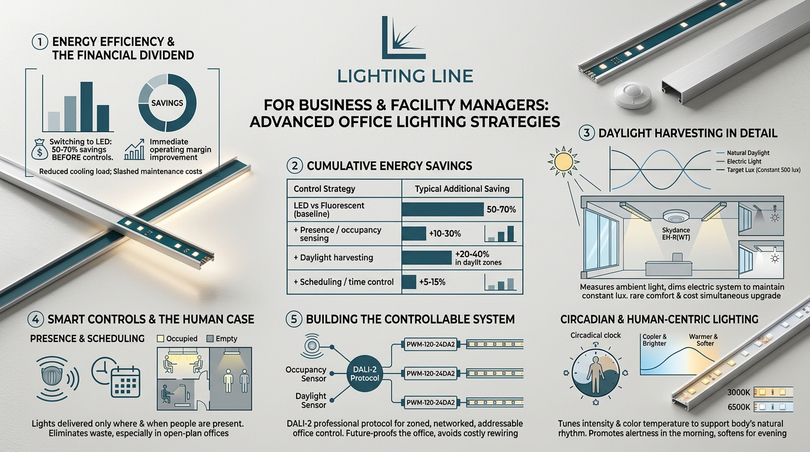
Switching from fluorescent to LED office lighting typically cuts lighting energy by 50–70% before any controls are added, because LEDs convert far more electricity into light and far less into heat. That heat reduction yields a secondary saving in summer cooling load. With efficient strip exceeding 120 lm/W, an office can hit its 500 lux target on a fraction of the legacy power budget, and the long LED lifespan slashes maintenance and re-lamping costs. For a business, this is a direct improvement to operating margin and, increasingly, to environmental reporting.
| Strategy | Typical additional saving |
|---|---|
| LED vs fluorescent (baseline) | 50–70% |
| + Presence / occupancy sensing | +10–30% |
| + Daylight harvesting | +20–40% in daylit zones |
| + Scheduling / time control | +5–15% |
Daylight harvesting in detail
Daylight harvesting is the practice of measuring available natural light and automatically dimming the electric system to maintain a constant target lux, never spending energy on light the sun is already providing. A sensor such as the Skydance EH-R(WT) reads ambient levels and outputs a 0/1-10V dimming signal, so the perimeter lights near windows quietly fade on a bright morning and brighten as cloud rolls in or dusk falls. The user perceives a steady, comfortable 500 lux all day while the meter spins more slowly, the rare upgrade that improves comfort and cost simultaneously.
Presence detection and scheduling
Occupancy and presence sensors ensure light is delivered only where and when people are present: meeting rooms, corridors and rarely used zones dim or switch off when empty, then respond instantly on entry. Layered with time-of-day scheduling, this eliminates the waste of lighting an empty floor overnight. In an open-plan office, intelligent zoning means each area responds to its own occupancy and daylight, rather than the whole floor being controlled as one crude block.
Circadian and human-centric lighting
The most advanced application of smart control is human-centric (circadian) lighting, which automatically tunes both intensity and colour temperature across the day to support the body’s natural rhythm, cooler and brighter to promote alertness in the morning, gradually warmer and softer toward the end of the working day. This is the technology that turns a windowless office into a healthy one and lifts a premium office from compliant to genuinely best-in-class. Delivered through tunable-white strip and a DALI-2 control system, it represents the convergence of energy efficiency and wellbeing that defines office lighting design in 2026.
Building the controllable system
All of this rests on the right control backbone: DALI-2 is the professional protocol for networked, addressable office control, enabling zoning, scheduling, daylight response and circadian tuning from a single system. Drivers like the PWM-120-24DA2 provide the DALI-2 interface at the fitting, while sensors feed occupancy and daylight data into the network. Specifying a control-ready system from the outset, even if advanced features are enabled later, future-proofs the office and avoids costly rewiring down the line.
A step-by-step office lighting design process
Bringing everything together, this section sets out a repeatable process for designing office lighting from a blank floor plan to a finished, commissioned scheme. Whether you are an architect formalising a method or a manager briefing a contractor, following these steps in order ensures nothing is missed and the result meets both the standards and the human goals established throughout this guide. This answers the recurring question of how to design lighting for an office in a structured, professional way.
Step 1 — Define the spaces and tasks
Map the floor by activity: open-plan desks, meeting rooms, reception, corridors, break-out zones. Each carries its own lux, UGR and colour-temperature target from the standards tables earlier. The design follows the task, not the other way round: you cannot specify until you know what each area is for.
Step 2 — Set the targets
For each zone, fix the maintained lux (500 for desks), the maximum UGR (≤19 for screen work), the minimum CRI (≥80, ideally ≥90), and the colour temperature (4000K for workspaces). These numbers become the brief against which every fixture is judged.
Step 3 — Plan the three layers
Lay out the ambient grid first to meet the base lux uniformly, then position task lighting where detailed work happens, then add accent for depth and wayfinding. Continuous linear strip in profile is the workhorse of all three layers in a modern office.
Step 4 — Calculate the load and select components
Convert lux targets to required lumens and thus to strip wattage per run: select strip (Performance for ambient, COB or Sunlike for task), profile (trimless, suspended, ultra-slim as the architecture dictates) and diffuser (opal for glare control). Size drivers with the 1.2× headroom rule and choose DALI-2 capability where control is wanted.
Step 5 — Design the control strategy
Decide zoning, daylight harvesting, occupancy sensing, scheduling and any circadian tuning. Specify sensors and a DALI-2 backbone so the system can deliver both the energy savings and the wellbeing features the brief calls for.
Step 6 — Install, test and commission
Follow the workshop guide for cutting, connecting and mounting. Test every run for voltage drop and flicker before closing up and finally, commission the controls (set the dimming curves, daylight set-points and any circadian schedule) and verify the delivered lux at the working plane with a light meter. A scheme is not finished until it is commissioned and measured.
| Step | Output |
|---|---|
| 1. Define spaces & tasks | Zoned floor plan |
| 2. Set targets | Lux / UGR / CRI / Kelvin per zone |
| 3. Plan three layers | Ambient + task + accent layout |
| 4. Calculate & select | Strip, profile, driver schedule |
| 5. Control strategy | Zoning, sensors, DALI-2 |
| 6. Install & commission | Tested, measured, signed-off scheme |
Office lighting trends for 2026
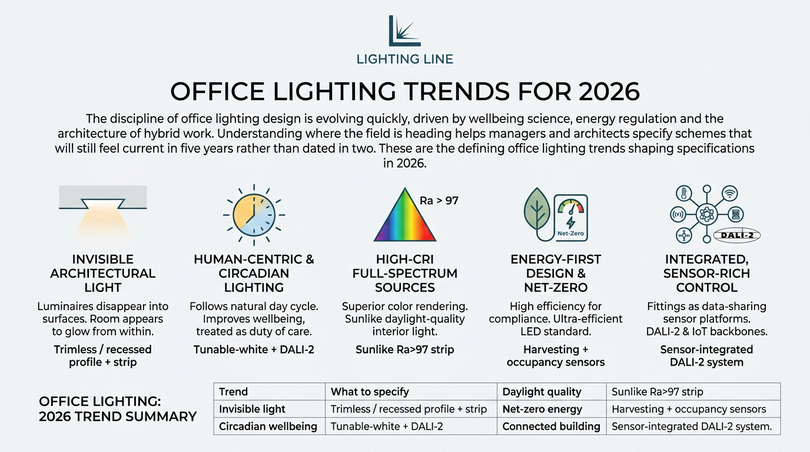
The discipline of office lighting design is evolving quickly, driven by wellbeing science, energy regulation and the architecture of hybrid work. Understanding where the field is heading helps managers and architects specify schemes that will still feel current in five years rather than dated in two. These are the defining office lighting trends shaping specifications in 2026.
Invisible, architectural light
The strongest aesthetic trend is the disappearance of the fixture: trimless and recessed strip, plastered seamlessly into ceilings and joinery, replaces visible luminaires entirely. The room appears to glow from its own surfaces, the purest expression of light felt, not seen. This is why trimless profiles and continuous strip dominate premium office lighting design today.
Human-centric and circadian lighting
Tunable-white systems that follow the natural day are moving from luxury to expectation, especially in deep-plan and windowless offices. The wellbeing evidence is now strong enough that progressive employers treat circadian lighting as part of their duty of care, not a perk.
High-CRI full-spectrum sources
The bar for colour rendering keeps rising. Where Ra ≥ 80 was once the office norm, full-spectrum Sunlike sources at Ra > 97 are becoming the specification of choice for any office that values comfort and accurate colour, a direct response to the demand for daylight-quality interior light.
Energy-first design and net-zero pressure
Tightening energy regulation and corporate net-zero commitments make daylight harvesting, occupancy control and ultra-efficient LED standard rather than optional. The most efficient office lighting is now a compliance and reporting issue as much as a cost one.
Integrated, sensor-rich control
Lighting is increasingly one node in a connected building, sharing occupancy and daylight data with HVAC and booking systems over DALI-2 and IoT backbones. The fitting is no longer just a light, it is a sensor platform. Specifying a control-ready system today is the surest way to future-proof an office.
| Trend | What to specify |
|---|---|
| Invisible light | Trimless / recessed profile + strip |
| Circadian wellbeing | Tunable-white + DALI-2 |
| Daylight quality | Sunlike Ra>97 strip |
| Net-zero energy | Harvesting + occupancy sensors |
| Connected building | Sensor-integrated DALI-2 system |
Office lighting for every role: manager, architect, HR and owner
Office lighting means something different to each person who has to live with it or pay for it. The office manager sees productivity and running cost, the interior architect sees aesthetics and sustainability and the HR lead sees wellbeing and visual fatigue; the business owner sees image and operating margin. A truly successful office lighting scheme answers all four at once, and this section addresses each role directly with the office lighting decisions that matter most to them.
Office lighting for the office manager
The office manager asks the most practical questions: what is the most effective office lighting for an open-space environment, how to reduce energy costs, which adjustable office lighting solutions cut visual fatigue, and what the latest office lighting innovations are. The answer is the layered LED strategy: uniform 4000K ambient office lighting at 500 lux for the open plan, individually controllable task office lighting at each desk to let people tune their own working plane, and intelligent control to drive down energy. Adjustable office lighting is the manager’s single most powerful tool, because it lets one open-space environment serve many different people without compromise. Reducing energy cost follows naturally from LED office lighting plus daylight harvesting and occupancy sensing, which together can halve the lighting bill while improving comfort.
Office lighting for the interior architect
The interior architect integrates office lighting into the whole design language of a space, balancing the most sustainable office lighting solutions against aesthetic ambition and energy efficiency. For this role, trimless and recessed office lighting profiles are the headline tools, because they hide the source entirely and let the architecture express the light. Sustainable office lighting means high-efficiency LED strip, recyclable aluminium profiles, daylight-responsive control and the longest practical service life, so the office lighting scheme reduces both energy use and replacement waste. The architect creates a more comfortable office lighting environment by layering ambient, task and accent, and by using high-CRI sources so finishes and materials read true under the specified office lighting. The current office lighting trends (invisible architectural light, circadian tuning and full-spectrum sources) are precisely the palette a forward-looking architect now works with.
Office lighting for the HR and wellbeing lead
The HR lead views office lighting through the lens of concentration, comfort and the reduction of visual disorders. The most suitable office lighting for concentration is neutral 4000K, flicker-free and glare-controlled, because it sustains alertness without fatigue. To reduce visual disturbances, the office lighting must eliminate flicker at the driver and control glare to UGR ≤ 19 through diffused profiles. The most ergonomic office lighting solutions are layered and adjustable, so each person can set comfortable task light without affecting colleagues. Natural office lighting carries clear wellbeing advantages over purely artificial schemes, which is why the best office lighting maximises daylight and then supplements it with high-CRI LED that mimics the missing solar spectrum. For raising staff awareness, the simplest message is that office lighting is a health factor, not décor: flicker and glare cause real headaches, and good office lighting prevents them.
Office lighting for the business owner
The business owner evaluates office lighting as an investment in image and operating cost. The best office lighting solutions for large organisations are coherent, control-ready LED systems specified from a single catalogue so quality and colour stay consistent across every floor. Intelligent office lighting systems pay back through energy savings (daylight harvesting, occupancy sensing and scheduling) and through the reduced maintenance of long-life LED. Beyond the balance sheet, considered office lighting elevates the company image: a crisp, glare-free, well-rendered office signals professionalism to every client and recruit who walks in. The market trend is unambiguous — office lighting is moving toward efficient, human-centric, connected systems, and the owner who specifies one now buys both lower cost and a stronger brand impression.
| Role | Primary office lighting priority | Key recommendation |
|---|---|---|
| Office manager | Productivity + cost | Adjustable 4000K + smart control |
| Interior architect | Aesthetics + sustainability | Trimless profiles, high-CRI, recyclable |
| HR / wellbeing | Comfort + eye health | Flicker-free, UGR ≤ 19, daylight |
| Business owner | Image + margin | Coherent control-ready LED system |
Room-by-room office lighting: applying the strategy everywhere
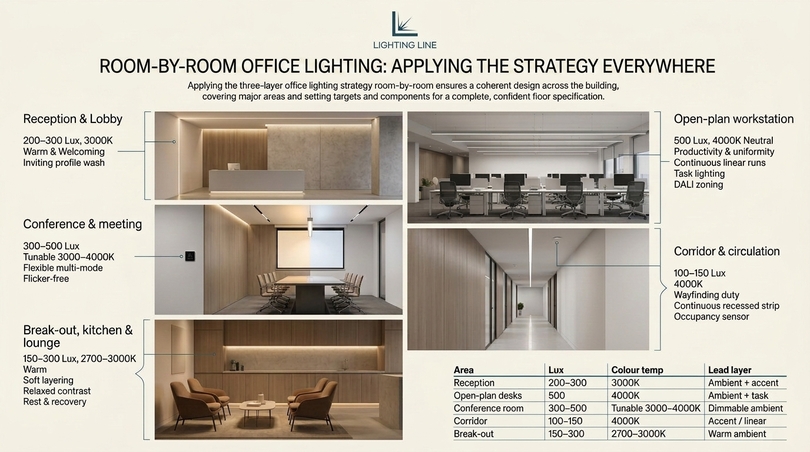
The three-layer office lighting strategy adapts to every space in a building, and applying it room by room is the surest way to a coherent whole. This section walks through the major office areas and sets out the office lighting approach, lux target and component choice for each, so a complete floor can be specified with confidence. Treating office lighting room by room prevents the common failure of designing the desks beautifully and forgetting the corridors, the reception or the meeting rooms.
Reception and lobby office lighting
Reception is where office lighting makes its first impression, so the brief blends welcome with professionalism. A warmer 3000K office lighting tone at 200–300 lux feels inviting, while a discreet accent layer and an ultra-slim profile grazing a feature wall or signage signals quality. The reception office lighting should be flattering and glare-free, because faces are constantly in view; diffused strip in profile is ideal. This is the one office area where warm office lighting is preferred over neutral, precisely because it is a social rather than a task space.
Open-plan workstation office lighting
The open-plan floor is the core of most office lighting projects: here the office lighting must be uniform, neutral 4000K and hit 500 lux at every desk, delivered through continuous linear runs that avoid the patchy pool and shadow of isolated downlights. Per-desk task office lighting and DALI zoning let the open-space office lighting serve many people at once. This is the area where getting office lighting right delivers the largest productivity dividend, simply because most of the workforce sits here.
Conference and meeting room office lighting
Meeting room office lighting must flex between modes: bright and neutral for collaborative work, dimmable and warmer for presentations and video calls. Tunable-white office lighting on a DALI-2 scene controller is the professional answer, holding 300–500 lux for working and dropping smoothly for screen sharing. Flicker-free office lighting is non-negotiable here because video conferencing exposes flicker instantly. Good conference room office lighting also flatters participants on camera, which has become a serious design consideration in the hybrid-work era.
Corridor and circulation office lighting
Circulation office lighting needs only 100–150 lux but plays a big architectural role: continuous recessed strip turns a corridor into a clean line of light that guides movement, the accent layer doing wayfinding duty. Corridor office lighting is the natural home for occupancy sensing, dimming when empty and brightening on approach, because nobody dwells there: subtle, efficient circulation office lighting ties the whole scheme together and reinforces the sense of a considered, professional environment.
Break-out, kitchen and lounge office lighting
Break-out office lighting deliberately departs from the workspace formula: warmer 2700–3000K tones, lower lux and softer layering create a relaxed contrast to the desks, supporting genuine rest. This warmer break-out office lighting helps people switch off and return refreshed, which is itself a productivity gain. Pendant or accent office lighting adds personality to these social spaces, distinguishing them clearly from the neutral, alert office lighting of the work floor.
| Area | Lux | Colour temp | Lead layer |
|---|---|---|---|
| Reception | 200–300 | 3000K | Ambient + accent |
| Open-plan desks | 500 | 4000K | Ambient + task |
| Conference room | 300–500 | Tunable 3000–4000K | Dimmable ambient |
| Corridor | 100–150 | 4000K | Accent / linear |
| Break-out | 150–300 | 2700–3000K | Warm ambient |
Maintaining and troubleshooting office lighting
An office lighting scheme is a long-term asset, and a little maintenance protects the investment: LED office lighting is famously low-maintenance compared with fluorescent, but it is not maintenance-free, and knowing how to diagnose the common faults keeps the office lighting performing as specified for its full service life. This section covers the practical upkeep and troubleshooting every facilities manager should know.
Routine maintenance
The main maintenance task for office lighting is keeping diffusers and surfaces clean, because dust on a diffuser reduces output and dulls the light over time: this is the maintenance factor built into the maintained-lux calculation. Periodically wiping diffusers restores the office lighting to its design brightness: beyond cleaning, LED office lighting needs little until end of life, when whole strips or drivers are replaced rather than individual lamps. Keeping a record of the strip and driver specifications makes future office lighting replacement straightforward and colour-consistent.
Troubleshooting flicker
If office lighting flickers, the cause is almost always the driver or a dimmer incompatibility, not the strip. A flickering LED usually means an undersized or low-quality driver, an incompatible dimmer, or a loose connection. Replacing the driver with a certified flicker-free model and confirming dimmer compatibility resolves the overwhelming majority of office lighting flicker complaints. Because flicker is a health issue, it should be treated as a priority fault, not a cosmetic one.
Troubleshooting dim or uneven output
If one end of a run is dimmer than the other, the office lighting run has exceeded its maximum length and is suffering voltage drop: the fix is to inject power at intervals or shorten the run. If a whole section is dead, suspect a bad connection or a cut made off the marked point. If the office lighting has dimmed and yellowed overall, the driver may be overheating from being undersized, the 1.2× headroom rule exists precisely to prevent this. Methodically checking connections, run lengths and driver loading diagnoses nearly every office lighting output fault.
When lights are too bright or too harsh
Complaints that office lighting is too bright almost always indicate a glare problem rather than excessive lux. The remedy is to diffuse the source, lower its luminance and, where possible, add dimming so occupants can tune the level. Replacing bare or clear-diffuser strip with opal-diffused strip in profile transforms harsh office lighting into comfortable office lighting without changing the lux target. Adding indirect, bounced light further softens the room.
| Symptom | Likely cause | Fix |
|---|---|---|
| Flicker | Driver / dimmer issue | Flicker-free driver, compatible dimmer |
| Far end dim | Voltage drop | Inject power / shorten run |
| Dead section | Bad join / off-point cut | Re-cut on mark, re-connect |
| Yellowing / fading | Undersized driver heat | Apply 1.2× headroom rule |
| Too harsh / bright | Glare, not lux | Opal diffuser + dimming |
Office lighting benchmarks and market context
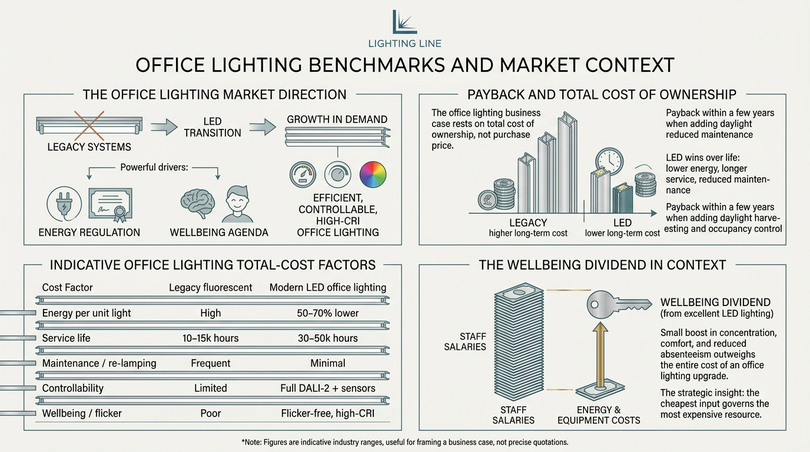
Decisions about office lighting are easier when set against market benchmarks and the wider direction of the lighting industry: this section places the office lighting recommendations of this guide in context, with representative figures that help managers and owners justify investment and architects align with where office lighting is heading. The numbers below are indicative industry ranges, useful for framing an office lighting business case rather than precise quotations.
The office lighting market direction
The commercial lighting market has shifted decisively toward LED, and office lighting sits at the centre of that transition, the two forces driving office lighting forward are energy regulation, which penalises inefficient legacy systems, and the wellbeing agenda, which rewards human-centric office lighting. The result is steady growth in demand for efficient, controllable, high-CRI office lighting: exactly the systems this guide specifies. An office lighting scheme designed to these principles is aligned with, rather than against, the direction of the market.
Payback and total cost of ownership
The office lighting business case rests on total cost of ownership, not purchase price: LED office lighting costs more upfront than the cheapest fittings but wins decisively over its life through lower energy, longer service and reduced maintenance. When daylight harvesting and occupancy control are added, the energy component of office lighting cost falls further, often delivering payback within a few years. For the owner, this means a quality office lighting specification is not an expense to minimise but an investment to optimise.
| Cost factor | Legacy fluorescent | Modern LED office lighting |
|---|---|---|
| Energy per unit light | High | 50–70% lower |
| Service life | 10–15k hours | 30–50k hours |
| Maintenance / re-lamping | Frequent | Minimal |
| Controllability | Limited | Full DALI-2 + sensors |
| Wellbeing / flicker | Poor | Flicker-free, high-CRI |
The wellbeing dividend in context
Because staff salaries dwarf energy and equipment costs in any office, the largest return from office lighting is almost always the human one: even a modest improvement in concentration, comfort or absenteeism, spread across a workforce, outweighs the entire cost of an office lighting upgrade. This is the strategic insight that elevates office lighting from a facilities line-item to a leadership decision: the cheapest input governs the most expensive resource. Framed this way, investing in excellent office lighting is among the most rational decisions a business can make.
Office lighting masterclass: every scenario, fully specified
This closing masterclass consolidates the office lighting knowledge of this guide into scenario-by-scenario specifications, so that whatever office lighting challenge you face, the answer is here in concrete terms. Each scenario restates the office lighting target, the office lighting layers, and the office lighting components, reinforcing the disciplined method that produces consistently excellent office lighting. Treat it as the practical conclusion to everything the guide has built.
Office lighting for the open-space environment
Open-space office lighting is the scenario most managers ask about first, because it covers the bulk of the workforce. The most effective office lighting for an open-space environment is a continuous grid of 4000K neutral white office lighting at 500 lux, delivered through linear strip in profile so the office lighting stays uniform across the whole floor. Per-desk task office lighting lets individuals tune their own office lighting, while DALI zoning lets areas of the open-space office lighting dim independently for daylight and occupancy: this open-space office lighting approach beats isolated downlights because continuous office lighting avoids the patchy shadows that make open-plan office lighting feel tiring. For the manager, this is the office lighting blueprint that maximises both productivity and comfort.
Office lighting that reduces visual fatigue
Office lighting designed to reduce visual fatigue is the HR priority, and the office lighting recipe is precise: flicker-free office lighting from certified drivers, glare-controlled office lighting at UGR ≤ 19 through diffused profiles, high-CRI office lighting at Ra ≥ 90, and neutral 4000K office lighting that sustains alertness. Adjustable office lighting then lets each person fine-tune the level, and a touch of bias office lighting behind monitors softens screen contrast, this combination is the office lighting most likely to reduce the headaches and tired eyes that dominate workplace complaints, because every known office lighting trigger of visual fatigue has been removed.
Office lighting for sustainability and energy saving
Sustainable office lighting is the architect and owner priority, and the office lighting answer combines high-efficiency LED office lighting with daylight-responsive control: the most sustainable office lighting uses efficient strip, recyclable aluminium profiles, and daylight harvesting so the office lighting never spends energy duplicating the sun. Occupancy-sensing office lighting switches off empty zones, and scheduling trims out-of-hours office lighting. Together, this sustainable office lighting cuts both energy use and replacement waste, aligning the office lighting scheme with net-zero goals while maintaining the 500 lux office lighting target throughout the working day.
Office lighting for image and brand
Office lighting that elevates company image is the owner’s interest, and here office lighting becomes a branding tool. Crisp, glare-free, high-CRI office lighting signals quality to every visitor: warm accent office lighting in reception creates a welcoming first impression and clean trimless office lighting throughout the workspace projects professionalism. Coherent office lighting specified from a single catalogue keeps colour and quality consistent across every floor, so the office lighting reinforces rather than undermines the brand. Investing in considered office lighting is, for the owner, an investment in how the company is perceived.
Office lighting for the windowless and difficult space
Difficult-space office lighting (windowless rooms, basements, deep-plan cores) is where office lighting expertise shows most. The office lighting solution is maximum-CRI Sunlike office lighting to mimic the missing daylight, a generous 500 lux of uniform office lighting so the room never feels gloomy, and circadian office lighting that shifts through the day to replace the absent solar cue. Indirect, bounced office lighting softens the windowless room further. This office lighting strategy turns the least promising space into a comfortable, healthy one, proving that excellent office lighting depends on design discipline rather than on the luck of having windows.
Office lighting for the home and garden office
Home and garden office lighting applies the same office lighting principles at domestic scale: the best home office lighting delivers 500 lux of 4000K office lighting on the desk, flicker-free and high-CRI, with task office lighting over the work surface and warm accent office lighting for the evening. Tunable office lighting suits the home and garden office especially well, since these spaces double as evening retreats: cool, focused office lighting by day and warm, relaxed office lighting by night. A single ceiling bulb can never match this layered home office lighting, which is exactly why the office lighting method in this guide matters even for one-person spaces.
Office lighting for meetings and video conferencing
Meeting-room office lighting in the hybrid era must serve cameras as well as people, flicker-free office lighting is essential because video exposes flicker instantly: tunable, dimmable office lighting lets the room shift from bright collaborative office lighting to softer presentation office lighting and high-CRI office lighting flatters participants on screen. Scene-controlled DALI-2 office lighting makes these transitions seamless. Getting meeting-room office lighting right has become a serious specification concern precisely because so much office communication now happens through a camera under that office lighting.
| Scenario | Office lighting priority | Key office lighting choice |
|---|---|---|
| Open-space | Uniformity + control | Linear 4000K grid + DALI zoning |
| Visual fatigue | Comfort | Flicker-free, high-CRI, UGR ≤ 19 |
| Sustainability | Energy | LED + daylight harvesting |
| Image / brand | Perception | Trimless, coherent, high-CRI |
| Windowless | Daylight substitute | Sunlike Ra>97 + circadian |
| Home / garden office | Flexibility | Tunable layered office lighting |
| Meetings / video | Camera + scenes | Flicker-free tunable DALI-2 |
The office lighting principles that never change
Across every scenario, the same office lighting principles hold. Office lighting is specified in lux at the working plane, with 500 lux the office lighting target for desks. Office lighting works best in three layers: ambient, task and accent. Office lighting for workspaces is neutral 4000K with the highest practical CRI. Office lighting must be flicker-free and glare-controlled to protect health. Office lighting power supplies follow the 1.2× headroom rule and office lighting reaches its full potential only when intelligent control harvests daylight and supports the body’s natural rhythm. Master these office lighting principles and every office lighting decision (from a single home office to a corporate headquarters) becomes clear, confident and correct. That is the enduring promise of well-designed office lighting: a workspace that quietly, reliably helps the people in it do their best work.
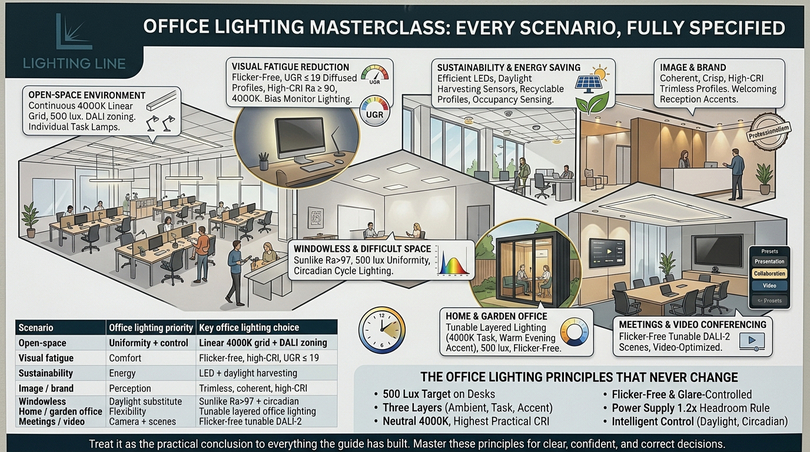
Frequently asked questions (FAQ)
| Office lighting — your questions answered |
|---|
How many lux should an office have?General open-plan areas need 300–500 lux and primary desk and computer work needs 500 lux measured at the working plane. Corridors need 100–150 lux, reception 200–300 lux, and fine technical work 750 lux or more. The 500 lux desk target is the cornerstone of office lighting design. |
Is 4000K or 3000K better for an office?4000K neutral white is better for workspaces because it enhances alertness and contrast without harshness, while 3000K warm white suits reception and break-out areas. The best modern answer is tunable white that shifts from cool morning light to warmer afternoon tones. |
What is the best office lighting for the eyes?Flicker-free, glare-controlled, high-CRI 4000K LED, layered so there are no harsh shadows or bright sources in view. Full-spectrum Sunlike strip at Ra>97 and a flicker-free driver are the single most important choices for eye comfort during long screen work. |
Can office lighting cause migraines?Yes. Migraines are commonly triggered by flicker from low-quality drivers and the glare of old fluorescent tubes. Specifying certified flicker-free drivers and diffused strip in profile removes the main triggers and typically resolves lighting-related headache complaints. |
How do you light an office with no windows?Deliver a solid 500 lux of uniform 4000K ambient light, specify the highest possible CRI (Sunlike Ra>97 to mimic daylight), and add tunable-white circadian control so the light shifts through the day as daylight would. Indirect uplighting further softens a windowless room. |
Are LED lights good for an office?Yes — LED is the modern office standard. It is highly energy-efficient, long-lasting, instantly controllable and, with quality drivers, flicker-free. The only caveat is quality: specify high-CRI strip and certified flicker-free drivers to realise the full benefit. |
What is the UGR and why does it matter?UGR (Unified Glare Rating) measures discomfort glare; lower is better. Office screen work requires UGR ≤ 19. Diffused, recessed strip in profile keeps luminance low and meets this easily, which is why bare LED point sources are unsuitable for offices. |
Why is COB strip recommended for desks?COB (Chip On Board) strip emits a continuous, dotless line of light, so it produces no “dotted” reflections on monitors or polished desks. This uniformity makes it the definitive choice for task lighting at workstations and conference tables. |
What is the 1.2× power supply rule?Always size the constant-voltage driver at least 20% above the total LED strip load. Running a supply at its absolute limit shortens its life and risks instability; the 20% headroom is the most important reliability rule in any LED strip installation. |
Where can a strip be cut, and how is it connected?Cut only on the printed cut-point lines, straight across the copper pads, never while powered. Connect by soldering (most reliable for commercial work) or solderless clips (faster for retrofit), always matching polarity. Mount the strip inside an aluminium profile for heatsinking and glare control. |
How do I reduce energy costs from office lighting?Switch to LED (50–70% saving), then add daylight harvesting, occupancy sensing and scheduling for further reductions. A DALI-2 control backbone with sensors like the Skydance EH-R(WT) maintains target lux while automatically dimming whenever natural light or empty rooms allow. |
What lighting is best for computer work?Even 300–500 lux ambient at 4000K, high CRI, flicker-free, with light positioned to the side of the monitor to avoid reflections, plus a low bias light behind the screen to reduce eye strain. Diffused strip in profile is ideal because it creates no harsh reflections. |
Building a future-proof office lighting scheme
Great office lighting is never an accident but it is the result of a clear method: understand why light matters to productivity and wellbeing, set the right lux, glare and colour targets, build the scheme in three coordinated layers, and execute it with quality components installed correctly. Follow that path and the office becomes measurably more comfortable, more productive, more energy-efficient and more professional — the rare investment that pays back in human terms and financial terms at once.
Effective office lighting requires a multi-layered strategy delivered through high-efficiency LED strip, hidden in well-chosen aluminium profiles, driven by flicker-free drivers and governed by intelligent control that harvests daylight and supports the body’s natural rhythm. Hit the 500 lux office standard with 4000K neutral white, push the CRI as high as the budget allows, eliminate flicker, and apply the 1.2× power rule, and the result is a workspace that genuinely supports the people in it.
Whether you are lighting a single home office or a multi-floor headquarters, the principles are the same, and the path from this article to a finished, future-proof scheme is a short one. Specify with intent, install with care, and let the architecture glow.
This article was developed with the support of artificial intelligence and subsequently reviewed, corrected, and validated by the LightingLine.eu technical team, which guarantees its reliability and compliance with official sources.